Question

TLS-Configured Windows CMA Checks Failing on Linux Poller (cmd.exe / plugin path errors)

  • June 12, 2025
  • 14 replies
  • 218 views

Forum|alt.badge.img+2

I'm monitoring a Windows client using Centreon Monitoring Agent (CMA) with TLS certificates. The agent has loaded the certificates successfully, and the Linux-based poller connects via port 4317.

I believe the certificate setup is correct (client cert, key, and CA), but host and service checks are failing with errors like:

Error: Host check command execution failed: could not create process 'cmd.exe': No such file or directory Error: Service check command execution failed: could not create process '{check:memory,': No such file or directory Error: Service check command execution failed: could not create process '{check:cpu_percentage,': No such file or directory Error: Service check command execution failed: could not create process 'C:Program FilesCentreonPlugins/centreon_plugins.exe': No such file or directory Error: Service check command execution failed: could not create process '{check:health,': No such file or directory Error: Service check command execution failed: could not create process '{check:service,': No such file or directory Error: Service check command execution failed: could not create process '{check:uptime,': No such file or directory

It looks like Centreon is either:

  • Trying to execute Windows-specific commands on the Linux poller

  • Misinterpreting check definitions or plugin paths (e.g., Windows-style paths or JSON-like parameters)

My questions:

  1. Are these errors due to incorrect check command definitions or misconfigured templates?

  2. What is the correct way to define service checks for a Windows CMA client (over TLS) when using a Linux poller?

  3. Is there an official or working example for this kind of setup?

Any advice or shared experience would be very helpful.

Thanks!

14 replies

fmattes
Centreonian
Forum|alt.badge.img+10
  • Centreonian
  • June 13, 2025

Hi, thanks for your interest in Centreon Monitoring Agent.


Did you followed this documentation to configure the platform, poller and Agent ? 

Could you provide your Centreon & Agent version ?


Forum|alt.badge.img+2
  • Author
  • Steward *
  • June 13, 2025

Hello fmattes, 


my centreon version is : v. 24.10.7

and the agent version i tried to use is : centreon-monitoring-agent-25.01.0


I assume that these are the latest versions and therefore the possibilities for success are already given.

I also followed the documentation but I don't understand what the certificates are all about. Where do I create them and especially how?


I also don't understand which certificates I should create and which I should transfer to the clients. I would have liked to see this in the documentation.


fmattes
Centreonian
Forum|alt.badge.img+10
  • Centreonian
  • June 13, 2025

Thanks for your answer.

Yes, it should work, and we're going to make sure that it does.

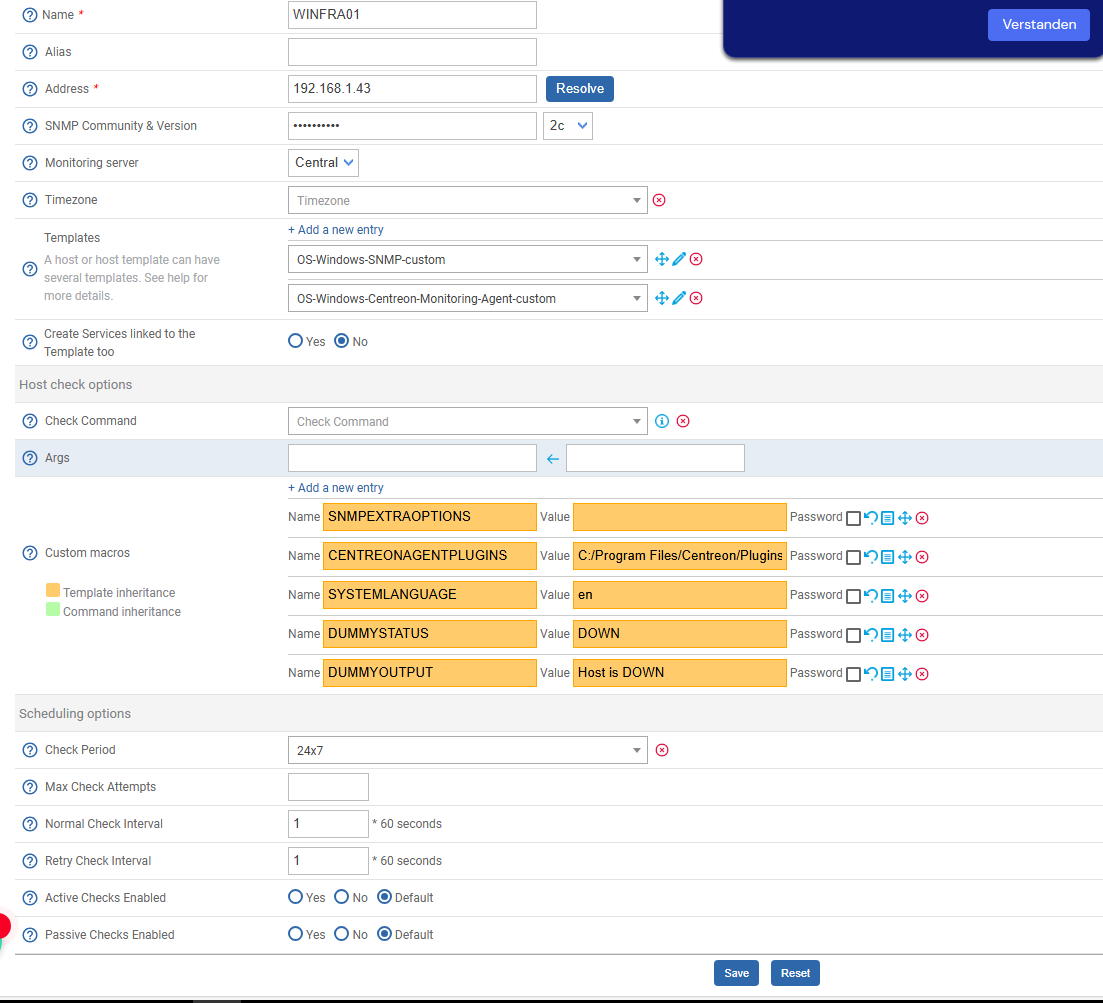
Could you check your Host “CENTREONAGENTPLUGINS” and “SYSTEMLANGUAGE” macros values ?

It should be 

  • CENTREONAGENTPLUGINS : C:/Program Files/Centreon/Plugins
  • SYSTEMLANGUAGE : en or fr, depending on your Host OS language

Forum|alt.badge.img+2
  • Author
  • Steward *
  • June 13, 2025

This is the current situation,the client os is installed in german. 

The CMA client is also installed onto this client but unable to start somehow. 


Forum|alt.badge.img+2
  • Author
  • Steward *
  • June 13, 2025

I can see in services.msc that centreon monitoring instantly “Crashes” or closes after i start it. 


fmattes
Centreonian
Forum|alt.badge.img+10
  • Centreonian
  • June 13, 2025

About certificates,


On Poller, files must be dropped (.crt/.key) in /etc/pki/ with the following rights : 

chmod 644 /etc/pki/agent*


On Host, files must be dropped anywhere you want, and path specified in installer


You can generate an autosigned certificate on your Poller with the following command : 

openssl req -new -newkey rsa:2048 -days 365 -nodes -x509  -keyout /etc/pki/agent.key -out /etc/pki/agent.crt -subj '/CN=poller'

Then put the CN (in this example : ‘poller’) as Host IP in Agent configuration, on Host.


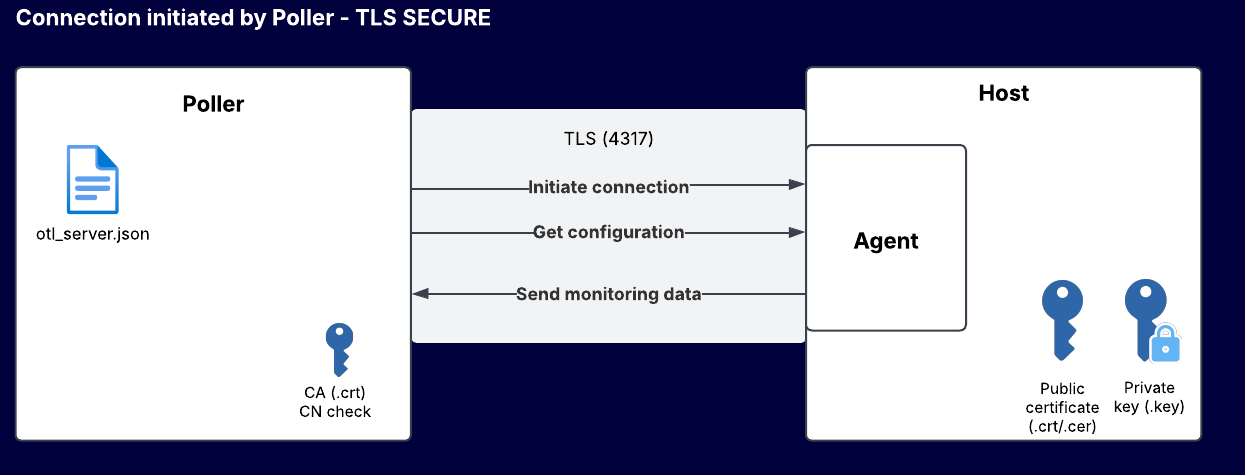
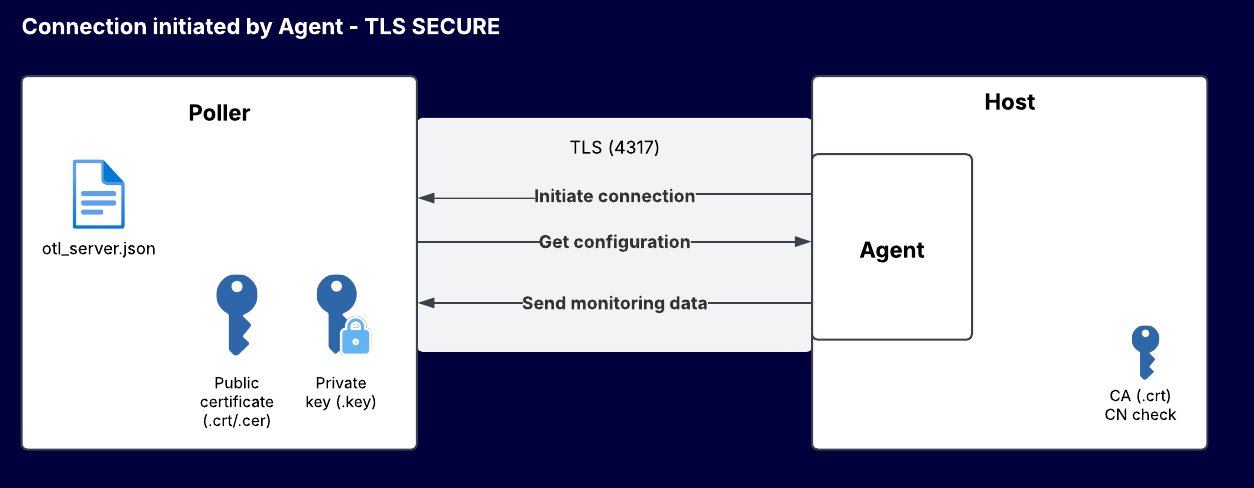
About which files to drop where, it depends which connection mode you are using “Connection initiated by Agent or by Poller”, and if you are using autosigned or signed certifcates.


Details are provided in this part of the documentation.


If not clear enough, let me know what is missing, and if needed we will plan a meet to solve your issue.


fmattes
Centreonian
Forum|alt.badge.img+10
  • Centreonian
  • June 13, 2025

I can see in services.msc that centreon monitoring instantly “Crashes” or closes after i start it. 


I send you a private message to plan a meet


Forum|alt.badge.img+7
  • Steward **
  • June 18, 2025

i have stupid a question, the certificates on the host, they have to be the poller”s certificates or the host’s certificates ? i wanna mean private key and public key ...


Forum|alt.badge.img+2
  • Author
  • Steward *
  • June 18, 2025

i have stupid a question, the certificates on the host, they have to be the poller”s certificates or the host’s certificates ? i wanna mean private key and public key ...

Iam currently not very sure. But once I have the cma running. I will write a report on how to set it up properly 


Forum|alt.badge.img+7
  • Steward **
  • June 19, 2025

it’s about that I ask the question, on the documents from Centreon it’s not very clear, we don’t know on the host whether it’s certificates’ own or the certifcates from the poller...if ​@fmattes  can answers it will be very nice 😁   


fmattes
Centreonian
Forum|alt.badge.img+10
  • Centreonian
  • June 19, 2025

i have stupid a question, the certificates on the host, they have to be the poller”s certificates or the host’s certificates ? i wanna mean private key and public key ...

Hi,

There is no stupid question :)

The certificate can be generated anywhere (on Poller, or wildcard), but his Common Name must mach with the Poller DNS used in Poller endpoint field, in Agent configuration (on Host).


We will enhance documentation on this part.


An enhancement is studied (TLS Insecure mode) to allow configuration of certificates whitout Common Name matching, which will allow to fill Poller endpoint with IP address, without having to edit /etc/hosts/.


Please note that, depending on the connection mode, the server is the Poller OR the Host, so the certificate files must be copied differently, as presented in the following schema : 


Let me know if you need mor explaination


Forum|alt.badge.img+7
  • Steward **
  • June 20, 2025

ok if I so understood, in the case where the connection is initiated by the poller, on the host, it must have the poller’s certificate in (poller.crt and poller.key)  with a DNS enable or the host file completed with ip & hostname from the certificates ,right ?


fmattes
Centreonian
Forum|alt.badge.img+10
  • Centreonian
  • June 20, 2025

ok if I so understood, in the case where the connection is initiated by the poller, on the host, it must have the poller’s certificate in (poller.crt and poller.key)  with a DNS enable or the host file completed with ip & hostname from the certificates ,right ?

That’s correct, the server must care .crt & .key, in this case, this is the Host.


Forum|alt.badge.img+7
  • Steward **
  • June 20, 2025

for me something is wrong, the poller.key is a private key, it has to stay private on the poller. why we must downloaded it on some hosts ? this certificate is used for checking the poller’s public key from a customer (host) in our case… 🤔