
Solved

Plugin ICMP using "nagios" Problem directory

  • November 14, 2023
  • 4 replies
  • 259 views

tsuko
Forum|alt.badge.img+8

Hi all, i’m using Centreon 23.10 on DEBIAN11.

I have a problem with my discovery Services of ESXi,  somes ressources/Services appears with this error ICMP:

When i look the command, this show me the directory “nagios” but in the V23.10, they said Centreon doesnt use Nagios plugins, and i haven’t any files or dir “nagios” and no plugins like nagios too
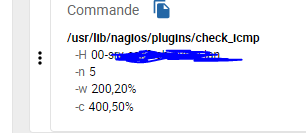
 

So how can i use the good plugins to make works this service? did i need to create directory, install Nagios-pluging-pack, or something like this?

 

Best answer by tsuko

Hi @rchauvel ! i’ve resolve my problem….i have just install a nagios-plugins-pack 

(apt install nagios-plugins*) and that work automaticaly ...i don’t understand why the connector’s services needed to use a nagios plugins...

4 replies

rchauvel
Centreonian
Forum|alt.badge.img+18
  • Centreonian
  • November 14, 2023

Have you installed the right connector and exported your configuration? (I guess you’re looking at VMWare ESX connector?). For this you need to go to  Configuration > Monitoring Connector Manager (for example for Linux SNMP).


tsuko
Forum|alt.badge.img+8
  • Author
  • Builder **
  • Answer
  • November 14, 2023

Hi @rchauvel ! i’ve resolve my problem….i have just install a nagios-plugins-pack 

(apt install nagios-plugins*) and that work automaticaly ...i don’t understand why the connector’s services needed to use a nagios plugins...


rchauvel
Centreonian
Forum|alt.badge.img+18
  • Centreonian
  • November 14, 2023

OK good that you solved it. Let me launch an investigation as this should not happen


ponchoh
Centreonian
Forum|alt.badge.img+14
  • Centreonian
  • November 14, 2023

@rchauvel MON-24584