

Question

Problème CMA service monitoring

  • Aug 26, 2025 6:13 AM UTC
  • 13 replies
  • 299 views

Forum|alt.badge.img+2

Bonjour,


Maintenant que j’arrive à faire communiquer correctement mon poller avec quelques clients CMA, je n’arrive toujours pas à superviser les services windows.
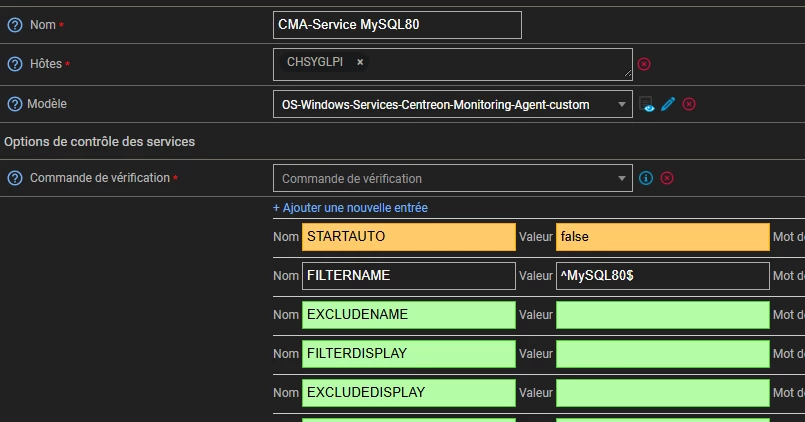


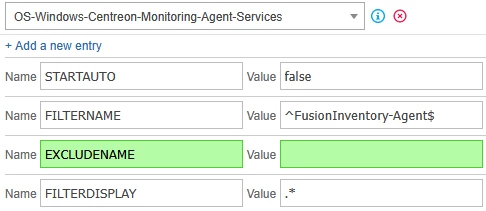
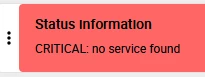
J’ai mon service qui est correctement nommé dans le FILTERNAME mais Centreon m’indique le message suivant :
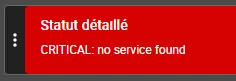
 

Est-ce que vous auriez une idée d’où je me serais trompé niveau configuration?


Merci
13 replies

ponchoh
Centreonian
Forum|alt.badge.img+14
  • Centreonian
  • Aug 26, 2025 2:45 PM UTC

Run the command without a filter and --debug --verbose to see which names get reported 🤔


Forum|alt.badge.img+2
  • Author
  • Steward **
  • Aug 26, 2025 2:48 PM UTC

Ok i found on the documentation how to test, but for services, there is no mode to test :

Windows Centreon Monitoring Agent | Centreon Documentation


Forum|alt.badge.img+4
  • Steward ***
  • Nov 24, 2025 3:06 PM UTC

Hi ​@nsetbon,

Have you found a solution? I have the same problem and try to understand the right syntax.

Thanks


Forum|alt.badge.img+2
  • Steward **
  • Nov 26, 2025 3:30 PM UTC

Bonjour,
Même problème depuis des semaines peut importe la version. Actuellement en 25.10 (Centreon et agent).
 

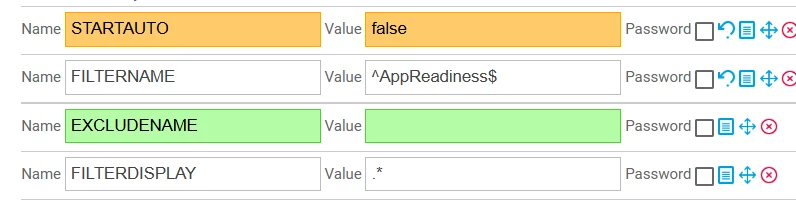
Config :


Status :


Pourtant il existe :


Comment faire ? Est-ce un bug ?


vcoum
Centreon Lord Commander
Forum|alt.badge.img+13
  • Centreon Lord Commander
  • Nov 27, 2025 2:55 PM UTC

Hello,

Set also a value to the FILTERDISPLAY macro (i set a wildcard, the Name filter will get the service i want)

Keep your filter on FILTERNAME macro

It should works this way


Forum|alt.badge.img+4
  • Steward ***
  • Nov 27, 2025 5:05 PM UTC

Hello,

​@vcoum I tried your solution, but it still doesn't work.


And same when I’m putting STARTAUTO → true :(

But thanks for your suggestion !


vcoum
Centreon Lord Commander
Forum|alt.badge.img+13
  • Centreon Lord Commander
  • Nov 27, 2025 6:27 PM UTC

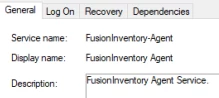
​@sps I tested it with the same service as you (FusionInventory-Agent) and i have the same problem (and none of the regex i used works)

But this is the only service that is not detected (i tried a dozen and they are all correctly detected)

I think that’s a bug for this one

Did it works for you with the other services?


Forum|alt.badge.img+2
  • Steward **
  • Nov 28, 2025 7:35 AM UTC

Hello,

Set also a value to the FILTERDISPLAY macro (i set a wildcard, the Name filter will get the service i want)

Keep your filter on FILTERNAME macro

It should works this way


Thanks for your message.
Same problem with :


vcoum
Centreon Lord Commander
Forum|alt.badge.img+13
  • Centreon Lord Commander
  • Nov 28, 2025 2:11 PM UTC

Yes it seems there is some problems in the service enumeration with the Agent

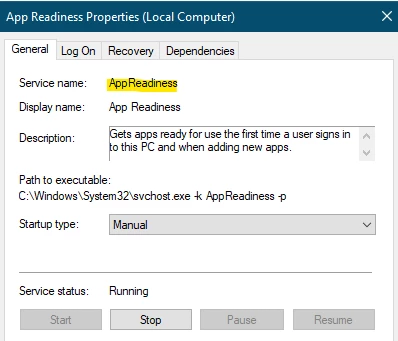
For what i observed, it concerns service with a long execution Path

Do you have the problem with all of your services ? Can you test with a service with a short path? (for example CentreonMonitoringAgent)


Forum|alt.badge.img+4
  • Steward ***
  • Nov 28, 2025 3:36 PM UTC

Hi ​@vcoum,

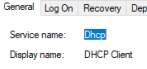
I tried with “Dhcp” and it works : 

The service “CentreonMonitoringAgent” also works.

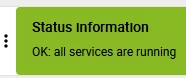
For a single service, it would be nice to have its name in the result as in the NSClient, here I have “all services are running” for 1 service.


vcoum
Centreon Lord Commander
Forum|alt.badge.img+13
  • Centreon Lord Commander
  • Nov 28, 2025 4:17 PM UTC

Okay so Centreon need to fix this in the agent code


For your result issue, it seems the output message is hardcoded in the agent so we can’t change it 

Maybe Centreon will add more options for outputs in the future


fmattes
Centreonian
Forum|alt.badge.img+11
  • Centreonian
  • Dec 10, 2025 3:05 PM UTC

Hi, there are known issueson CMA Services check, which are currently being fixed and will be released soon.

We also planned to add some filters


Issue

STARTAUTO filter is not working properly.


Enhancement - 3 new filter options

<start-type> : filter on service startup type : auto, boot, system, demand, disabled ; optional ; default/empty : all modes

<delayed> : filter/exclude delayed startup services - regex :

  • true : only delayed services

  • false : only non-delayed services

  • empty or missing (default) : all services ; optional

<type> : filter on service type - regex ; optional ; default : service / empty : all types


Forum|alt.badge.img+2
  • Author
  • Steward **
  • Jan 2, 2026 8:29 AM UTC

Yes it seems there is some problems in the service enumeration with the Agent

For what i observed, it concerns service with a long execution Path

Do you have the problem with all of your services ? Can you test with a service with a short path? (for example CentreonMonitoringAgent)


Hi,

i think you’re right, i tried with several services, and only services with long execution path doesn’t work.