
Solved

Extraction de graph (generateMetricImage.php)

  • September 13, 2023
  • 5 replies
  • 138 views

Bonjour,

Je souhaiterai utiliser un petit script powershell pour faire des extractions de graphiques. J’utilise dĂ©jĂ  cette commande qui fonctionne bien :

### Timestamps 
$TempsUnix=get-date (Get-Date -Format hh:mm:ss) -UFormat %s
$30DerniersJours=$TempsUnix-(3600*24*30)

### Bypass de l'erreur de contrĂŽle de certificat
add-type @"
using System.Net;
using System.Security.Cryptography.X509Certificates;
public class TrustAllCertsPolicy : ICertificatePolicy {
public bool CheckValidationResult(
ServicePoint srvPoint, X509Certificate certificate,
WebRequest request, int certificateProblem) {
return true;
}
}
"@
[System.Net.ServicePointManager]::CertificatePolicy = New-Object TrustAllCertsPolicy

### Téléchargement du .png via un compte dédié
$source="https://$($serveur)/centreon/include/views/graphs/generateGraphs/generateImage.php?username=$($utilisateur)&token=$($Jeton)&start=$($30DerniersJours)&end=$($TempsUnix)&hostname=$($Hote)&service=$($service)"

$destination="C:\CheminXYZ\$($test).png"

Invoke-WebRequest -Uri $source -OutFile $destination

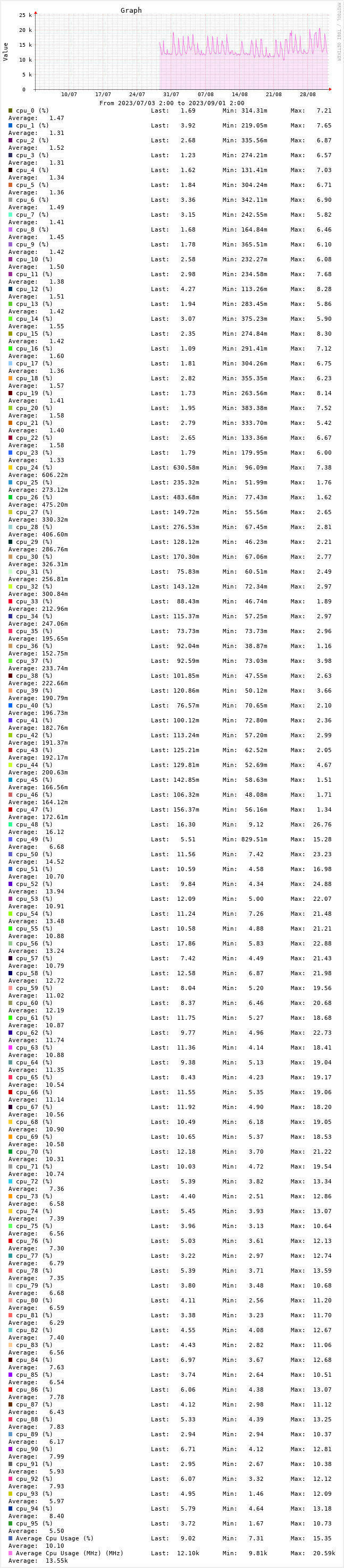
Seulement voilĂ , certaines sondes ont beaucoup trop de mĂ©triques et il y a plus de lĂ©gende que de graph’ dans le .png fini.


J’ai testĂ© une page lĂ©gĂšrement diffĂ©rente :

https://x.x.x.x/centreon/include/views/graphs/generateGraphs/generateMetricImage.php?cpt=1?&svcId=126_773&start=1694591040&end=1694601840&metric=434

Seulement j’obtiens un .png blanc, vide. L’URL fonctionne bien dans une page web sous rĂ©serve de m’ĂȘtre dĂ©jĂ  connectĂ© avec un compte qui a les droits pour. J’ai tentĂ© d’injecter ce petit morceau mais sans succĂšs :

username=$($utilisateur)&token=$($Jeton)

Est-ce qu’il est possible d’utiliser un compte avec une clef d’auto-connexion pour rĂ©cupĂ©rer des graphiques depuis la page generateMetricImage.php ? Ou doit-je me rĂ©signer a utiliser un service en plus sur l’hĂŽte qui ne monitor que la mĂ©trique souhaitĂ© ?


Merci :)


Best answer by christophe.niel-ACT

I have tried as I said above with your powershell script :

(j’ai essayĂ© avec ton script powershell comme je disais plus haut : )

$source="https://$($serveur)/centreon/include/views/graphs/generateGraphs/generateImage.php?username=$($utilisateur)&token=$($Jeton)&start=$($30DerniersJours)&end=$($TempsUnix)&hostname=$($Hote)&service=$($service)&metric=123456"


this work for a single metric with its ID, your script works

(cela marche pour une métrique unique avec son ID, le script marche bien)


(basiquement les posts prĂ©cĂ©dents disent que le code PHP prend un paramĂštre “metric”, qu’il prend un ID, ou une liste d’ID, je n’arrive pas a trouver la syntaxe pour faire une liste, mais pour un seul ID de mĂ©trique ca marche nickel, le plus dur Ă©tant de trouver le bon id de mĂ©trique associĂ© au host/service)

5 replies

Forum|alt.badge.img+17

Hello,

I’ll reply in english, but if you read the code of “generateImage.php” there is a “metric” parameter

https://github.com/centreon/centreon/blob/875ea8cd30f160c23e3bee17032dac7f3e8c31b4/centreon/www/include/views/graphs/generateGraphs/generateImage.php#L253


try adding “&metric=434” in you pour powershell $source variable.

the PHP code seems to imply it can be a list, so I guess “metric=434,435,436” could be possible (hypothetic value)


I could not test as I don’t know what your token $jeton is (is it the autologin key?)


edit : the metric may not be an id, and be a name, it does not says metric_id in the php code


Forum|alt.badge.img+17

mmh I managed to run your script with a bit of trial and error, it was indeed the autologin key for $jeton


it works fine “&metric=434”, so you can use the ID, it does not work with metric name


I can’t seem to pass 2 metrics, but I don’t really know how to passe a “list”, but at least it works for a single metric ID


  • Author
  • October 9, 2023

Hello,


Thanks for your answer. Sorry I did’nt translate (My english is not very good).

I did’nt show what I try to avoid :


“Average %” is what I want to keep. I don’t need more than 1 metric so if it works with only one, it’s perfect. I don’t have much time fort tests (I just came back from holidays). I’ll give my feedback in few days.

And yes, “jeton” is the autologin token. I need it. If not, it generate a blank picture.


Thanks

++


Bonjour,


Merci pour le retour. J’aurais effectivement pu traduire le post
 j’ai pas un super anglais mais j’aurais pu tester avec Google translate. J’avais pas mis d’exemple de ce que voulais pas : cf image.


Je souhaite conserver qu’un seul mĂ©trique. Si ça fonctionne qu’avec une seule ça ira trĂšs bien. Je testerai ça dans quelques jours, j’ai quelques sujets a traiter aprĂšs mon retour de vacances.

Et oui, c’était bien le paramĂštre pour l’autologin. Sans ça j’ai une image blanche qui se gĂ©nĂšre.


Merci

++


Forum|alt.badge.img+17

I have tried as I said above with your powershell script :

(j’ai essayĂ© avec ton script powershell comme je disais plus haut : )

$source="https://$($serveur)/centreon/include/views/graphs/generateGraphs/generateImage.php?username=$($utilisateur)&token=$($Jeton)&start=$($30DerniersJours)&end=$($TempsUnix)&hostname=$($Hote)&service=$($service)&metric=123456"


this work for a single metric with its ID, your script works

(cela marche pour une métrique unique avec son ID, le script marche bien)


(basiquement les posts prĂ©cĂ©dents disent que le code PHP prend un paramĂštre “metric”, qu’il prend un ID, ou une liste d’ID, je n’arrive pas a trouver la syntaxe pour faire une liste, mais pour un seul ID de mĂ©trique ca marche nickel, le plus dur Ă©tant de trouver le bon id de mĂ©trique associĂ© au host/service)


  • Author
  • July 24, 2024

đŸ‡«đŸ‡·

Bonjour,


Merci c’est parfait. Je viens fraichement de m’y remettre (aprùs tout ce temps). On ajoute simplement le

&metric=200

comme vous le disiez et ça roule 😊

Attention Ă  la casse ! Et puis le numĂ©ro varie selon la mĂ©trique souhaitĂ©. On peu rĂ©cupĂ©rer ce nombre en splitant les graph’ et en rĂ©cupĂ©rant l’URL d’origine du tĂ©lĂ©chargement du graph’.

Merci


🇬🇧

Hello,


Thank you, that's perfect. I just got back to it recently (after all this time). We just need to add the

&metric=200

part you mentioned, and it works 😊

Be mindful of the case! Also, the number varies depending on the desired metric. You can retrieve this number by splitting the graphs and getting the original download URL of the graph.

Thanks