Needs Votes

Auto Discovery - regular automatic execution/schedule for services

Related products:Infra Monitoring - Discovery
  • March 7, 2024
  • 5 replies
  • 129 views

Forum|alt.badge.img+11

Hello all,

As it is already possible to automate and schedule the automatic discovery of new hosts.

We want to be able to do the same with automatic service discovery.

Indeed, this automation process has already existed for a few years for the hosts discovery but will be much more useful for the services configurations.

A host's services are added and removed much more regularly than a host itself.

This is not convenient that auto discovery for services remains manual and cannot be automatically scheduled.


Indeed, we have autodiscovery templates for services but these must be activated manually each time an network interface is added on a host.

It would also be very convenient if the services corresponding to the interfaces could be activated and deactivated depending on whether the interface is admin-up or admin-down.

Today in the state of this manually-autodiscovery-service-process as soon as a virtual or physical interface is added we are forced to run several different templates for a single host. It will be nice to don’t have to worry about this and don’t wast time for that.

Indeed today we scan (manually) and add and active all the serivices-checks for all the interfaces of a host whether they are admin-up or admin-down in order to avoid executing the manual-autodiscovery with many templates on many hosts every 2 days.


It would be great if these jobs ran automatically at scheduled intervals.


Thanks a lot

5 replies

Forum|alt.badge.img+5
  • Centreonian
  • March 8, 2024
NewNeeds Votes

Forum|alt.badge.img+7
  • Steward *
  • March 22, 2024

Hi,

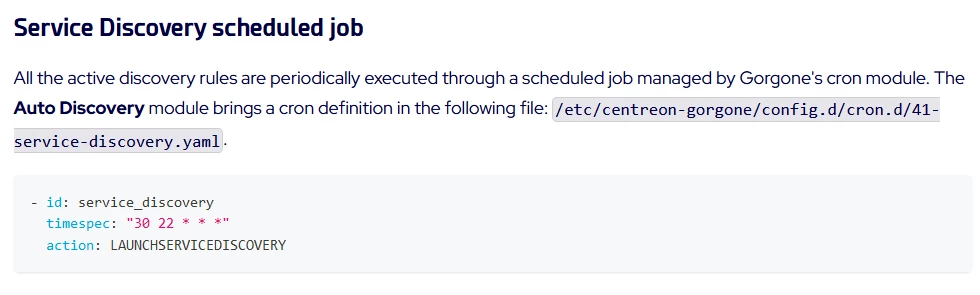
It is already possible to schedule auto-discovery to add new services. See :

https://docs.centreon.com/docs/monitoring/discovery/administration/#gorgone-module-configuration

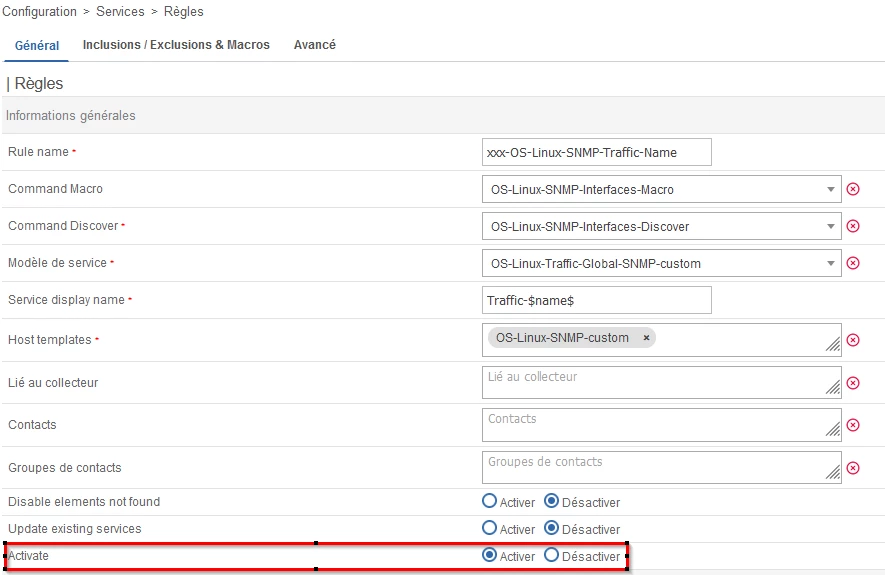
You also need to activate each rules :


I use auto-discovery for add network cards and disks (Linux, Windows, VmWare). That works well.


Automatically disabling services is riskier. Has the service been disabled or is it not working? For most services, it seems difficult to automate without human check.


Regards


Forum|alt.badge.img+11
  • Author
  • Builder *
  • March 26, 2024

Hello,

@cb58 Thanks to you I see that the mechanisms automatic execution already exist. Thank you very much, you saved me a lot.


@ centreon,

Perhaps you should clarify the existence of this good feature by putting it forward or by renaming this option more explicitly than only a poor text "enable" or at least add a description that explains it.


Also as said, I want to be able to activate or deactivate services depending on the status of the admin-up and admin-down interface.

Unfortunately, as the discover macros use the plugins included in the Centreon plugin pack and these only contain the OID ifOperStatus for macro and not ifAdminStatus, it is therefore not possible to achieve this.

Indeed, if an interface is admin-up but which becomes oper-down should not be ignored by autodiscovery and even less desactived by it. The usefulness of the “disable elements not found” function is missed.

Likewise, it is a shame that the discovery macros on the plugin-pack do not contain the discovery of ifAlias.

Ideally the autodiscover function should be more generic to be personalized to search for personalized OIDs.

It should be not linked to a plugin-pack scripts brand so that users can do personalized service-autodiscovery with equipment or OIDs that you have not included/develop.

Thanks a lot


Forum|alt.badge.img+11
  • Author
  • Builder *
  • March 26, 2024

While we are on the subject and these "hidden/secret" functions.

Does anyone know how the other 2 options work and are useful ?

  1. “disable elements not found”
  2. “update exiting services”


“disable elements not found” does it only deactivate what the job itself had previously found or does it (stupidly) deactivate all the services associated with the host ? Can be used even if 2 differents autodiscovery jobs are running on the same host ?


“update exiting services” I imagine it only serves to change the macros of the service or can it do something else? renamed the service? other things ?


Thanks a lot


Forum|alt.badge.img+11
  • Author
  • Builder *
  • March 28, 2024

About the configuration of the cron.d for to adapt the schedule time for add new services,

I modified the file below but the configuration was not applied, the auto-discovery ran at the default time.


/etc/centreon-gorgone/config.d/cron.d/41-service-discovery.yaml


What should I do to apply the new cron settings?

on the central and on the pollers?

is auto discovery always executed by the poller carrying the host or by the central ?


Also my autodiscovered services are saved in the "Configuration > Services > Services by host" menus but the configuration was not pushed to the pollers…

There isn't even a flag on the pollers indicating a configuration change that needs to be pushed…

Is this normal or do I have a bug ?


Thanks a lot


centreon-auto-discovery-server-23.10.1-1.el8.noarch

centreon-broker-23.10.4-1.el8.x86_64

centreon-gorgone-23.10.4-1.el8.noarch

centreon-web-23.10.10-1.el8.noarch