

Discussion ongoing

Dashboards – Resource Table widget: choose displayed columns + add “Status information” column

Related products:Infra Monitoring - Dashboards
  • Oct 28, 2026 8:56 AM UTC
  • 3 replies
  • 6 views

Forum|alt.badge.img+2

Hello,

In Centreon 25.10 Dashboards, the Resource Table widget lets us reorder columns by drag & drop, but we can’t choose which columns are displayed. The Custom Views widgets (Host / Service Monitoring) offer per-widget options to show or hide each column, including the output.

  • All columns are always displayed, which wastes space on small widgets and wall screens.
  • The status information (plugin output) is missing, so operators have to open the details panel or Resource Status to understand an alert.
  1. Add a “Columns” section in the widget settings, with a checkbox for each column: Status, Resource, Parent, Duration, Last check, Tries, Severity, Status information, Notes/Action URL…
  2. Add a “Status information” column with options for max length/truncation, full text on hover, and single-line or multi-line display.

This would bring the Resource Table widget on par with the Custom Views widgets and let operators understand alerts directly from the dashboard.

Thanks!

3 replies

rchauvel
Centreonian
Forum|alt.badge.img+18
  • Centreonian
  • Oct 30, 2026 1:03 PM UTC
Updated idea statusNew→Needs Votes

Adrien Morais-Mestre
Centreonian
Forum|alt.badge.img+8

Hi ​@gregory.zivanovic,


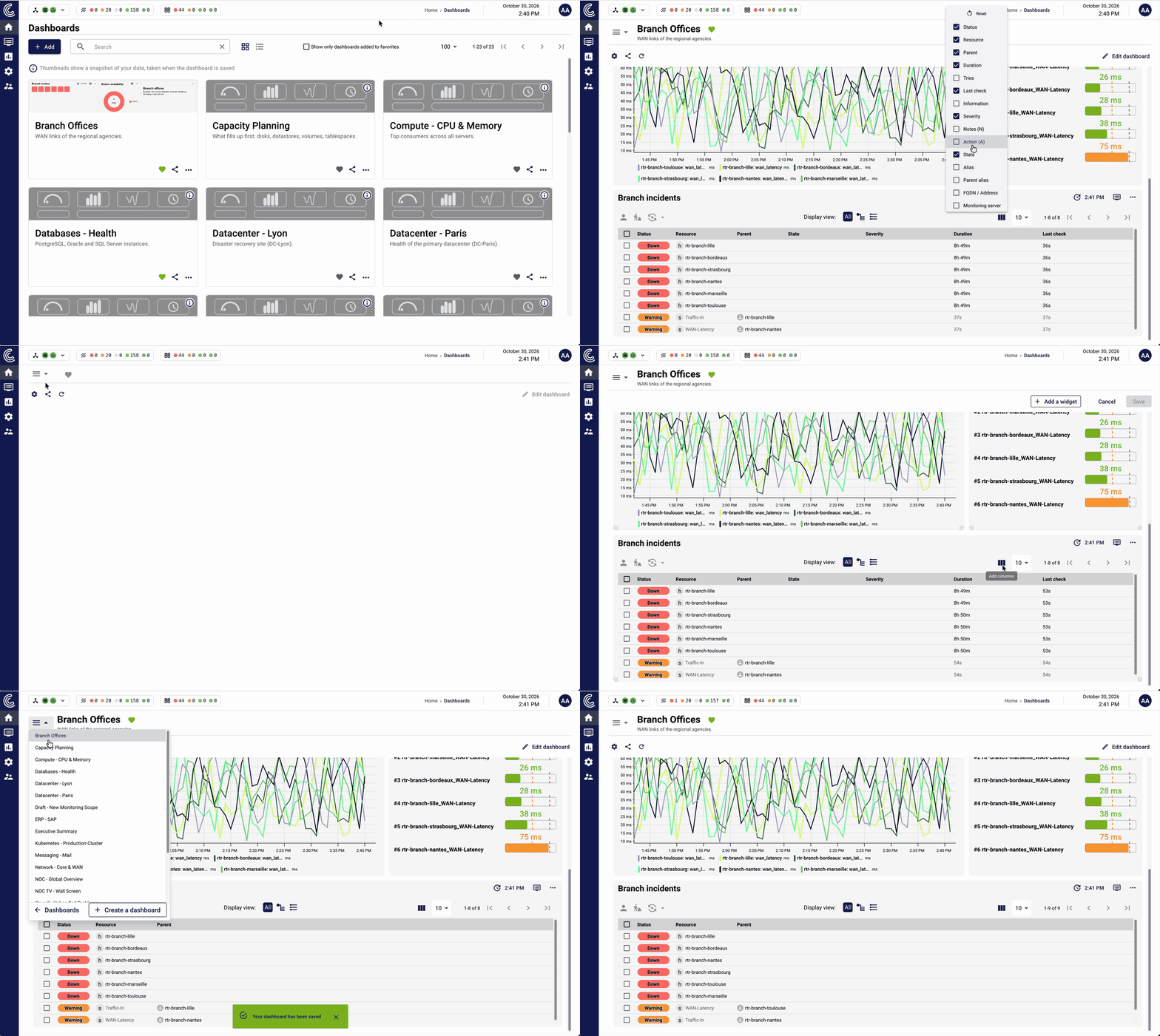
Part of what you're asking for is already available in Centreon 25.10.x. Column selection in the Resources Table widget has been there since 25.10.0, and it already existed in 24.04. Here is a short video showing how it works:


In view mode (first part of the video), any user can change the displayed columns. These changes are not saved: they only last for the current session. Users can add columns when they need more details, without changing the dashboard for anyone else.

In edit mode (second part of the video), if you change the displayed columns and save the dashboard, the selection is saved with the widget. It then becomes the default view in view mode for every user of the dashboard.

Regarding your second request, we don't plan to add display settings (max length, single-line or multi-line) to the "Information" column at the widget level. However, we can add a tooltip that shows the full output when hovering over the column. Today the column only shows the first line of the output, so this would let users read the complete status information without leaving the dashboard.

Would it be enought ?

Regards.

Adrien


Forum|alt.badge.img+5
  • Centreonian
  • Oct 30, 2026 2:17 PM UTC
Updated idea statusNeeds Votes→Discussion ongoing