Released

Dell PowerStore Rest API does'nt have capacity check

Related products:Infra Monitoring - Monitoring
  • October 17, 2022
  • 15 replies
  • 245 views

Forum|alt.badge.img+4

Hello,

I need to monitor the RAM usage on Dell PowerStore because I changed my Hardware.

https://docs.centreon.com/pp/integrations/plugin-packs/procedures/hardware-storage-dell-powerstore-restapi/

Unfortunately on this Pack, no adequate service is offered. is it possible to add it please.

15 replies

rchauvel
Centreonian
Forum|alt.badge.img+18
  • Centreonian
  • October 21, 2022
NewDiscussion ongoing

omercier
Centreonian
Forum|alt.badge.img+15
  • Centreonian
  • November 18, 2022

Hi @Wisonic ,

The hardware mode of the plugin should give you information about the memory (`dimm`), according to the `--help`:

/usr/lib/centreon/plugins/centreon_dell_powerstore_restapi.pl     --plugin=storage::dell::powerstore::restapi::plugin --mode hardware --help
[...]
--component
Which component to check (Default: '.*'). Can be: 'appliance',
'battery', 'dimm', 'disk', 'enclosure', 'fan', 'node',
'iomodule', 'psu', 'sfp'.
[...]

Can you try it and display the result here?


Forum|alt.badge.img+4
  • Author
  • Steward *
  • December 6, 2022

Hi @omercier,

thank you for your answer, unfortunately the dimm option only displays the count and not the usage

/usr/lib/centreon/plugins/centreon_dell_powerstore_restapi.pl --plugin=storage::dell::powerstore::restapi::plugin --mode=hardware --hostname='XX.XX.XX.XX' --port='XXX' --proto='https' --api-username='XXX' --api-password='XXXX' --timeout=30 --insecure --component=dimm

OK: All 2 components are ok [2/2 dimm]. | 'hardware.dimm.count'=2;;;;


rchauvel
Centreonian
Forum|alt.badge.img+18
  • Centreonian
  • December 19, 2022
Discussion ongoingIn Backlog

Forum|alt.badge.img+3
  • Steward *
  • January 18, 2023

We don’t have that information (memory usage). If you have the information, please provide the curl example (with the json output).


Forum|alt.badge.img+4
  • Author
  • Steward *
  • January 20, 2023

Hi,
I found the curl example :
 

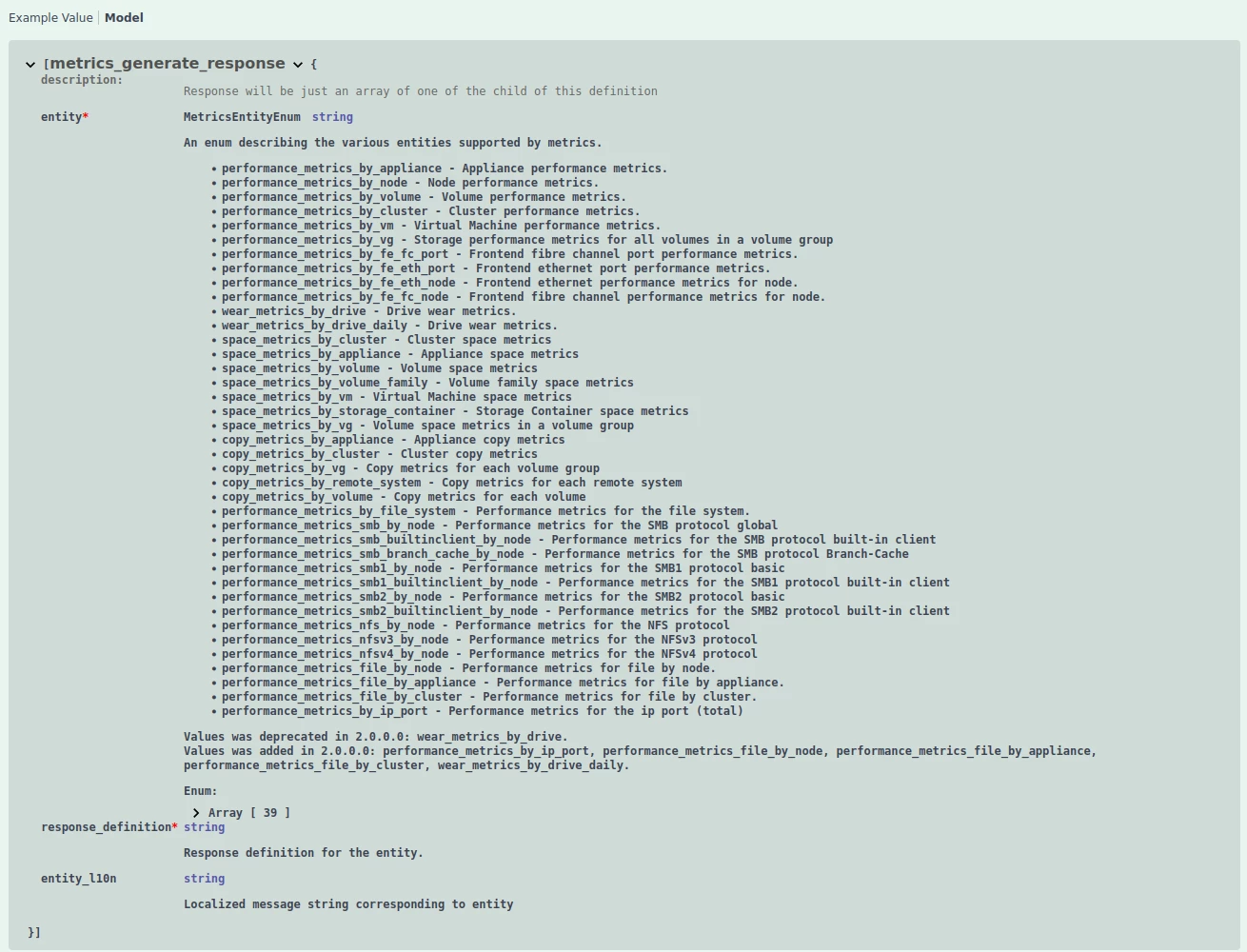
curl -k -s -u 'XXXX:XXXX' -X POST "https://XXXX/api/rest/metrics/generate" -H  "accept: application/json" -H  "Content-Type: application/json" -d "{  \"entity\": \"space_metrics_by_appliance\",  \"entity_id\": \"A1\",  \"interval\": \"One_Day\"}"

(Your entity_id can be different)

(interval can be [ Twenty_Sec, Five_Mins, One_Hour, One_Day ])

Here the model :


And a part of the output :

{
"appliance_id": "A1",
"timestamp": "2023-01-20T00:00:00Z",
"last_logical_provisioned": XXXXXXXXXXXXXXX,
"last_logical_used": XXXXXXXXXXXXXXX,
"last_physical_total": XXXXXXXXXXXXXXX,
"last_physical_used": XXXXXXXXXXXXXXX,
"max_logical_provisioned": XXXXXXXXXXXXXXX,
"max_logical_used": XXXXXXXXXXXXXXX,
"max_physical_total": XXXXXXXXXXXXXXX,
"max_physical_used": XXXXXXXXXXXXXXX,
"last_data_physical_used": XXXXXXXXXXXXXXX,
"max_data_physical_used": XXXXXXXXXXXXXXX,
"last_efficiency_ratio": XXXXXXXXXXXXXXX,
"last_data_reduction": XXXXXXXXXXXXXXX,
"last_snapshot_savings": XXXXXXXXXXXXXXX,
"last_thin_savings": XXXXXXXXXXXXXXX,
"max_efficiency_ratio": XXXXXXXXXXXXXXX,
"max_data_reduction": XXXXXXXXXXXXXXX,
"max_snapshot_savings": XXXXXXXXXXXXXXX,
"max_thin_savings": XXXXXXXXXXXXXXX,
"last_shared_logical_used": XXXXXXXXXXXXXXX,
"max_shared_logical_used": XXXXXXXXXXXXXXX,
"last_logical_used_volume": XXXXXXXXXXXXXXX,
"last_logical_used_file_system": XXXXXXXXXXXXXXX,
"last_logical_used_vvol": XXXXXXXXXXXXXXX,
"max_logical_used_volume": XXXXXXXXXXXXXXX,
"max_logical_used_file_system": XXXXXXXXXXXXXXX,
"max_logical_used_vvol": XXXXXXXXXXXXXXX,
"last_shared_logical_used_volume": XXXXXXXXXXXXXXX,
"last_shared_logical_used_file_system": XXXXXXXXXXXXXXX,
"last_shared_logical_used_vvol": XXXXXXXXXXXXXXX,
"max_shared_logical_used_volume": XXXXXXXXXXXXXXX,
"max_shared_logical_used_file_system": XXXXXXXXXXXXXXX,
"max_shared_logical_used_vvol": XXXXXXXXXXXXXXX,
"repeat_count": XXXXXXXXXXXXXXX,
"response_definition": "space_metrics_by_appliance_rollup",
"entity": "space_metrics_by_appliance"
}

for memory used, it’s “last_physical_used” and your max capacity “last_physical_total”


Forum|alt.badge.img+3
  • Steward *
  • January 26, 2023

Wisonic, could you test with that archive ? https://github.com/centreon/centreon-plugins/archive/refs/heads/MON-16307-dell-powerstore-add-memory.zip

I’m not sure about the endpoint to get all appliances.


Forum|alt.badge.img+5
  • Centreonian
  • January 30, 2023
In BacklogPlanned

omercier
Centreonian
Forum|alt.badge.img+15
  • Centreonian
  • February 7, 2023

@Wisonic have you been able to test when Quentin sent you?


Forum|alt.badge.img+4
  • Author
  • Steward *
  • February 14, 2023

@omercier No, I have this message when I click on the link


Forum|alt.badge.img+3
  • Steward *
  • February 14, 2023

Forum|alt.badge.img+4
  • Author
  • Steward *
  • February 17, 2023

command :

/usr/lib/nagios/plugins/centreon-plugins-develop/src/centreon_plugins.pl --plugin=storage::dell::powerstore::restapi::plugin --mode memory --hostname='XXXXXXXX' --port='443' --proto='https' --api-username='XXXXXX' --api-password='XXXXX' --timeout=30 --insecure

result :

UNKNOWN: Not a HASH reference at /usr/lib/nagios/plugins/centreon-plugins-develop/src/storage/dell/powerstore/restapi/mode/memory.pm line 106.

line 106 :

my $free = $appliances->{$appliance_id}->{last_physical_total} - $appliances->{$appliance_id}->{last_physical_used};

I added lines to see the value of “appliances” :

use Data::Dumper;
print(Dumper($appliances));

Part of the value of the “appliance” variable :

[...]
{
'data_physical_used' => '49469899253630',
'efficiency_ratio' => '37.872887',
'physical_total' => '100772340419788',
'shared_logical_used_vvol' => 0,
'data_reduction' => '3.1138513',
'logical_used_volume' => '954367618404352',
'snapshot_savings' => '23.156494',
'shared_logical_used_file_system' => 0,
'logical_used_file_system' => 0,
'entity' => 'space_metrics_by_appliance',
'logical_used' => '954367618404352',
'timestamp' => '2023-02-10T15:40:00Z',
'logical_provisioned' => '1873567813730304',
'appliance_id' => 'A1',
'shared_logical_used' => '154041910538240',
'thin_savings' => '1.9394302',
'shared_logical_used_volume' => '154041910538240',
'logical_used_vvol' => 0,
'physical_used' => '53772262330404',
'response_definition' => 'space_metrics_by_appliance',
'repeat_count' => 1
},
{
'data_physical_used' => '49470207949167',
'efficiency_ratio' => '37.872646',
'physical_total' => '100772340419788',
'shared_logical_used_vvol' => 0,
'data_reduction' => '3.1140058',
'logical_used_volume' => '954364607332352',
'snapshot_savings' => '23.14904',
'shared_logical_used_file_system' => 0,
'logical_used_file_system' => 0,
'entity' => 'space_metrics_by_appliance',
'logical_used' => '954364607332352',
'timestamp' => '2023-02-10T15:45:00Z',
'logical_provisioned' => '1873567813730304',
'appliance_id' => 'A1',
'shared_logical_used' => '154050514681856',
'thin_savings' => '1.9394801',
'shared_logical_used_volume' => '154050514681856',
'logical_used_vvol' => 0,
'physical_used' => '53772552130081',
'response_definition' => 'space_metrics_by_appliance',
'repeat_count' => 1
}
]
};

the check does not just retrieve the last value which I think blocks the result


Forum|alt.badge.img+3
  • Steward *
  • February 17, 2023

Could you provide the full result with --debug-stream option ? Sent it in a file to qgarnier@centreon.com please.


Forum|alt.badge.img+4
  • Author
  • Steward *
  • February 17, 2023

sent


rchauvel
Centreonian
Forum|alt.badge.img+18
  • Centreonian
  • September 22, 2023
PlannedReleased