Duplicate

Enhanced Vmware connector configuration screen

Related products:Infra Monitoring - Administration
  • June 20, 2025
  • 4 replies
  • 39 views

Forum|alt.badge.img+12

Hello,


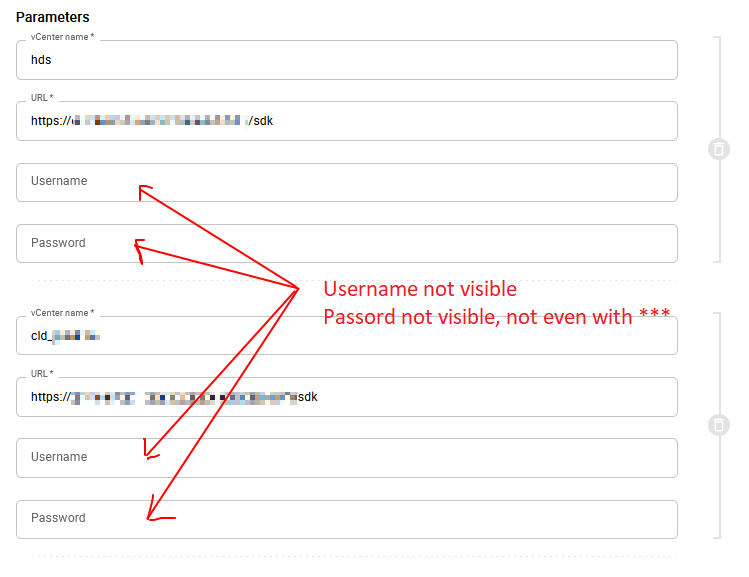
There is some big problem in the UI of the WMware connector configuration 

(Configuration > Connectors > Additional Configurations)


When you have added one server, and edit it again, you are unable to :

See the username

See the password

All the fields are appears blank, but in fact the values are here.

So you don’t know if the values has been filled, and you are unable to check them.

look at this screen, all the information are here, but invisible
 

What must be done to get something right :

  1. Show the username
  2. Replace the password with stars
  3. Add an icon who look like an eye, when clicking on it, reveal the passord

Thanks

4 replies

Forum|alt.badge.img+5
  • Centreonian
  • June 27, 2025
NewIn Backlog

fmattes
Centreonian
Forum|alt.badge.img+10
  • Centreonian
  • June 27, 2025

Hi, thanks for your feedback.

We are working to improve this behavior.


Forum|alt.badge.img+5
  • Centreonian
  • December 1, 2025
In BacklogPlanned

lpinsivy
Centreonian
Forum|alt.badge.img+21
  • Centreonian
  • December 11, 2025
Updated idea statusPlannedDuplicate
Idea merged into:

All the votes from this idea have been transferred.