Discussion ongoing

Poller list filtering/sorting

Related products:Infra Monitoring - Administration
  • December 10, 2025
  • 18 replies
  • 126 views

Forum|alt.badge.img+9

Hi,

I would like to propose a idea, that in the configuration→ pollers page, it would be possible to filter or sort poller list by the conf changed column also.  It is quite annoying to scroll and one by one choose the pollers to upload the configuration to (especially if you have 40+ probes like we have).

Also add a feature at least in the beginning to see who made the change and later also to see the list of changes made to the configuration (if I remember it correctly then just like Juniper devices show differences - show configuration | compare roll-back ). It cant be that hard, as the system already understands that there have been changes made to the configurations as it shows conf changed YES.

Also would be perfect if this feature is something that can be enabled or disabled either globally or defined by user. Why like that - because if there is just 1 person doing changes in the monitoring, then he/she knows exactly what changes they have done. But if there are more people doing the changes, then it would be good to know who is doing the changes, what changes and to make sure you are not uploading somebodies half configured hosts/services etc.

18 replies

Forum|alt.badge.img+11

That’s multiple ideas, i would split them in multiple posts if I were you, but in summary.

1) Sorting of Poller within the list based on the ones being modified or not
Is it so you can do individual reloads ? In latests versions you have a one click button to reload all pollers, isn’t it enough, or maybe its too long with 40+ pollers ?


2) Have the history of every modification

Like in an audit way ? Be able to see which user did what action, or just as an informative detail on the poller, i’m not sure if i understood correctly. But I would see a use to be able to see the latest modification on an asset, but unless you have many many users doing host modifications at the same time, I personally don’t see much use of this.


Forum|alt.badge.img+8
  • Steward **
  • December 11, 2025

That’s multiple ideas, i would split them in multiple posts if I were you, but in summary.

1) Sorting of Poller within the list based on the ones being modified or not
Is it so you can do individual reloads ? In latests versions you have a one click button to reload all pollers, isn’t it enough, or maybe its too long with 40+ pollers ?


The filter which would let to see only poller for which configuration was changed would be very useful.
I thought about that for a long time but this idea was always rejected claiming that the one-click button is avalable.
The one-click button to reload all the pollers can stay but doesn’t seem to be as flexible as this very simple filter in the pollers configuration page. It is a very simple change to implement.


Forum|alt.badge.img+11

It is a very simple change to implement.


If it is so much, the code is always open source, you can make a contribution to add that feature on the page list. But jokes aside i agree that it could be usefull in some specific cases


Forum|alt.badge.img+8
  • Steward **
  • December 12, 2025

Hello,

I thought a little bit about that and maybe better and more convenient way to handle this use case would be adding a new button “Select all pollers with conf changed”. Using this button all pollers with conf changed would be selected and then “Export configuration” button can be used.
That would be more convenient to use instead of a filter which would require usually 3 clicks:
1. Set the filter to “Display pollers with conf changed”.
2. Click “Search” button.
3. Click “Export configuration” button.

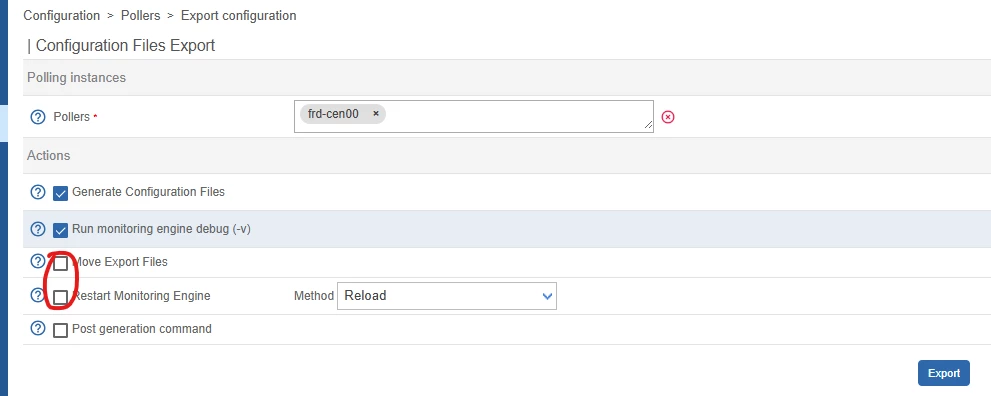
Additionally to that it would be nice also to have these 2 checkboxes automatically selected.
In 99,99% cases of using this form I have to select both of them every time.


rchauvel
Centreonian
Forum|alt.badge.img+18
  • Centreonian
  • December 12, 2025
NewDiscussion ongoing

Forum|alt.badge.img+11

Even based on that, i’m unsure of a thing. Here you especially want to reload the pollers that have been modified before. Is the reason why the fact that if you have many many pollers it takes too long or have implications ?

If not then i would say that reloading all pollers no matter if they had modifications is ok and this can be done on the quick export button.

If there is impacts on that, maybe having a change in behavior for the quick export button can be adapted to maybe only target the pollers that had modification ?


Forum|alt.badge.img+8
  • Steward **
  • December 12, 2025

Let’s put it this way:
When using the Quick export button I don’t see any warnings (export diagnostic results) which the classic export displays back and that allows me to correct configuration if needed. The Quick export button just displays the initial message with “please wait” which then disappears and after about a minute a new pop-up is displayed saying the export and reload was complete. No verbose output with warnings (which exist because I can see them in classic export). I don’t know if the Quick export will display anything about failed exports because it never happened to us while using it (and we don’t use it very often to be honest).
With the classic export the verbosity just feels better.

So, we are sticked to the classic way of exporting changed configuration to pollers. And every time when I have to select e.g. 10 pollers (for which conf changed) out of the total 46 pollers I feel my hand just hurts when putting a tick at every small checkbox by each of those 10 pollers :) 

This is is very nice idea:
“… maybe having a change in behavior for the quick export button can be adapted to maybe only target the pollers that had modification ?” 
but I would like having an additional Quick export button dedicated for pollers that had modifications.
And of course the quick export diagnostic results should be presented somehow like the classic export does to an admin if anything bad happens during the export.


Forum|alt.badge.img+9
  • Author
  • Steward ***
  • December 15, 2025

Even based on that, i’m unsure of a thing. Here you especially want to reload the pollers that have been modified before. Is the reason why the fact that if you have many many pollers it takes too long or have implications ?

If not then i would say that reloading all pollers no matter if they had modifications is ok and this can be done on the quick export button.

If there is impacts on that, maybe having a change in behavior for the quick export button can be adapted to maybe only target the pollers that had modification ?

Hi,

Answer to the question - Yes, we have over 40 pollers, and if I reload all of them it takes sometimes up to 5 min to load and if I do it several times in lets say in 5 minutes, the gorgone crashes and needs to be restarted on central. (Using restart option when uploading conf to all 40 pollers takes about 10 min for all services and hosts to show up in monitoring).


Forum|alt.badge.img+9
  • Author
  • Steward ***
  • December 15, 2025

That’s multiple ideas, i would split them in multiple posts if I were you, but in summary.

1) Sorting of Poller within the list based on the ones being modified or not
Is it so you can do individual reloads ? In latests versions you have a one click button to reload all pollers, isn’t it enough, or maybe its too long with 40+ pollers ?


2) Have the history of every modification

Like in an audit way ? Be able to see which user did what action, or just as an informative detail on the poller, i’m not sure if i understood correctly. But I would see a use to be able to see the latest modification on an asset, but unless you have many many users doing host modifications at the same time, I personally don’t see much use of this.

  1. I just want to upload conf to those probes that really have configuration changed (as I explained in my last answer up, it sometimes it makes our central gorgone crash) and if I make changes to templates and want to test that on some certain probes, I avoid having mis-configured template on ALL probes.
  2. Like audit yes, and to see who and what was changed. Sometimes people do changes to for example service or host name (if there are multiple users doing the changes), they forgot to upload the conf. I already see that there are pending changes on the probe, so if I do changes to the device that is on the same poller, I never know if I will also apply somebodies have configured host/service or if there is pending actual change.


Centreon - Do you want me to split the ideas to two different posts or can I keep them both here?


Forum|alt.badge.img+11

Centreon - Do you want me to split the ideas to two different posts or can I keep them both here?

Personally i’d say split it so both can be discussed seperately. And as this one already has Poller filtering, lets keep that topic here and make another one for the audit changes feature.


Forum|alt.badge.img+9
  • Author
  • Steward ***
  • December 15, 2025

Centreon - Do you want me to split the ideas to two different posts or can I keep them both here?

Personally i’d say split it so both can be discussed seperately. And as this one already has Poller filtering, lets keep that topic here and make another one for the audit changes feature.

I made a separate idea request for the audit part. 


Forum|alt.badge.img+11

Ok, so back on that topic of poller specifically, as the page for pollers feels a bit deprecated (but i’m unsure about that), i would instead advocate for a behavior change on the main export configuration button to only target the pollers that had changes detected to limit the reload time. I think that would batch the need here.


Forum|alt.badge.img+9
  • Author
  • Steward ***
  • December 15, 2025

That a good idea, but…..I would still prefer a  filtring in the poller page so I can still choose to which probes I upload conf, because that will avoid me to upload conf to probes, that are not needed. For example I have changed conf on 4 probes, but there is one probe where my colleague is doing changes, and I dont want to upload conf there.

The one button idea is I would say more for those systems, where only 1 person is making changes. But that is purely my opinion.


Forum|alt.badge.img+11

If you want to manually select wich probe you want to export to, then you do it manually, i’m not sure what you need to be added in that case then.


Forum|alt.badge.img+9
  • Author
  • Steward ***
  • January 8, 2026

I want to able to filter the probes on the poller page, to have the list for example filtered by config changed yes. We have almost 50 probes, and if I change configs on several then then it is quite frustrating to scroll and search for the ones that have conf changed, when I could just have them filtered and list as first ones.


Forum|alt.badge.img+2
  • Steward *
  • January 8, 2026

It would also be useful to be able to filter/sort by uptime, so that during maintenance windows we could see which probes have been rebooted etc. We have a lot of probes and just scrolling through them is not efficient. 


fmattes
Centreonian
Forum|alt.badge.img+10
  • Centreonian
  • February 6, 2026

Hi, 

The need, as I understand it: 
- Only export configurations that have changed
- Be able to do so effortlessly (no manual selection poller by poller)
- Be able to log warnings/errors (not just via top counter)

What we currently do: 
we export all pollers, whether they have changed or not, either via top counter or the Poller menu

What do you think of these possible enhancements ? ->
 
- Configuration > Pollers: filtering on the “conf changed” column, allowing mass selection of only those pollers

- Configuration > Pollers > Export configuration: ability to select all pollers that have “conf changed” set to true with a single click (checkbox or poller selection)

- Top counter > Export configuration: offer a checkbox in the modal to export only pollers that have “conf changed” set to true 


Forum|alt.badge.img+11

I’m ok with that enhancement list