Description
Currently, when a service inherits configuration values from a service template in Centreon, the inherited values are not clearly visible when viewing the service configuration.
For example, when opening a service and navigating to sections such as Service Scheduling Options, Notification Scheduling Options, Service severity or URLs, the fields may appear empty or without any indication of the values inherited from the associated service template.
To determine the actual configuration, the user must navigate to the related service template and open its settings separately.
This makes it difficult to understand the effective configuration of a service and requires additional navigation between the service and its template.
Proposed Improvement
Display the inherited values directly within the service configuration interface.
Inherited settings should be visually distinguished from values explicitly configured on the service. For example:
The interface should clearly distinguish the source and state of each setting: Proposed example:
- Orange — the setting is inherited from the service template.
- White with orange border — the setting is explicitly defined at the service level.
- Blank / neutral state — the setting is not defined at either the service or template level.
- Any other possible option (in case something has been missed in idea)
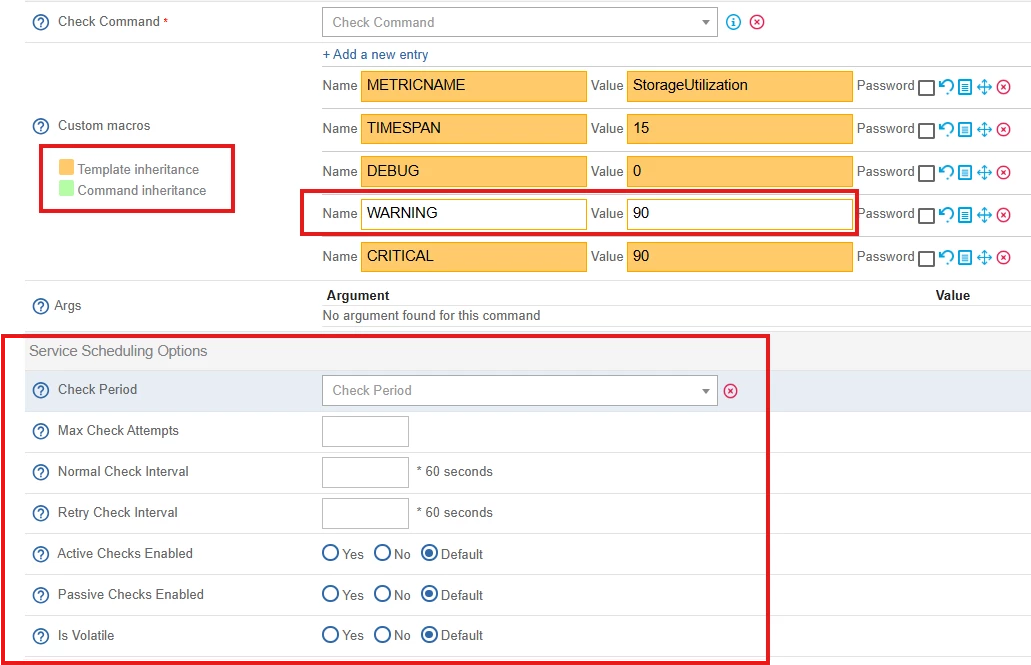
Example: Visualization of Inheritance at Macro Level (picture attached)
All settings inherited from the service template are displayed in orange, while settings explicitly defined at the service level are displayed in white.
This visual distinction allows users to immediately identify configuration value and its source without navigation to the related service template.