Solved

ESX-Memory counter.

  • June 30, 2022
  • 4 replies
  • 1622 views

Forum|alt.badge.img+2

Hello Team

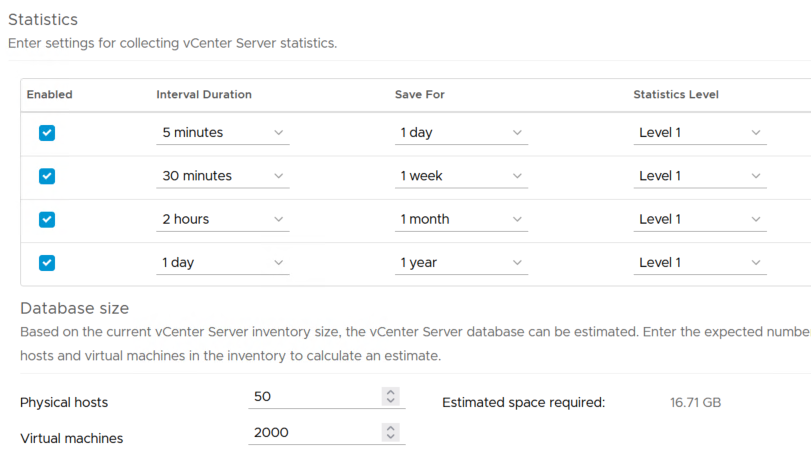
I have just added few ESXi to the centreon. All monitored services are ok except ‘Esx-Memory’, which has status UNKNOWN with error: Cannot get counter 'mem.state.latest' for the sampling period '300' (counter level: 2, sampling level: 1) . I found some advise that it can be fixed in vcenter web client but i cannot find where to change value from 1 to 2 for ‘ mem.state.latest ‘ settings, which is responsible for this counter.


Best answer by sims24

Hi, 


Don’t know if it’s the same for ESXi but on vCenter you can do it following this documentation: https://docs.vmware.com/en/VMware-vSphere/6.7/com.vmware.vsphere.vcenterhost.doc/GUID-5D85751A-2CE8-4FD5-83C8-90A17060631E.html


Maybe you have the same Configure tab with settings and so on. 

4 replies

rchauvel
Centreonian
Forum|alt.badge.img+18
  • Centreonian
  • June 30, 2022

Topic moved to data collection


sims24
Forum|alt.badge.img+19
  • Ranger ***
  • Answer
  • June 30, 2022

Hi, 


Don’t know if it’s the same for ESXi but on vCenter you can do it following this documentation: https://docs.vmware.com/en/VMware-vSphere/6.7/com.vmware.vsphere.vcenterhost.doc/GUID-5D85751A-2CE8-4FD5-83C8-90A17060631E.html


Maybe you have the same Configure tab with settings and so on. 


Forum|alt.badge.img+2
  • Author
  • Steward **
  • June 30, 2022

Thank You ‘sims24’


Forum|alt.badge.img+5
  • Steward **
  • February 20, 2024

@jakubsz What option did you change on centreon to fix this issue? I am getting the same error. for example for vm memory stats: UNKNOWN: Cannot get counter 'mem.active.average' for the sampling period '300' (counter level: 2, sampling level: 1)

I dont want to change anything on vcenter and would prefer to change on centreon. 

My vcenter config is default config.