Hello,For the past few days, I've been looking into using Centreon to monitor my IT infrastructure.I installed Centreon 24.10.7 on a VM, then a few hosts and services.My Windows servers are being monitored, butI'm struggling with how to view the status of the disks in a Qnap NAS.I'm monitoring the volumes, but I haven't figured out where to tell Centreon how to check the NAS disks to be notified if they're faulty.Thank you for your help.Eric

Solved
How to monitor disk status on a Qnap NAS
 +5
+5Best answer by christophe.niel
I guess you have the translation in the browser, “materiel global” is the check “hardware-global”
it should return the disk status like on my screenshot
you won’t get any “mapping” information, that is not provided by snmp on the qnap, so you have a critical partition because it is consumming more than 90% of the total space
for the “timeout” on the hardware, I suggest you add --snmp-fore-getnext in the snmp extraoption on the service, this should fix the timeout issue

next, the “disk” check, this is different from the volume check and is not the physical disk, but the “disk” as they are returned by the linux os, it’s in fact all the partitions of all the file systems in the QNAP
you may be ok with just using the “Volumes” service, wich tell you wich disk number are used, the status, type of raid and disk usage, maybe you don’t need the “disk-global” check
I don’t like using the “disk-global”, as it is confusing because all is mixed in a single, you should “discover” your partition individually
go in the service/scan menu
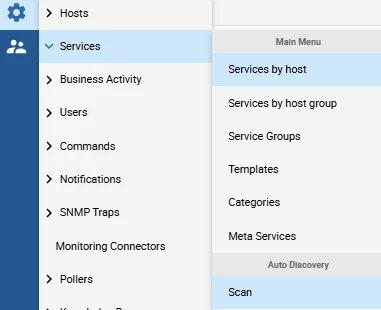
input your hostname, and select the qnap-snmp-disk-name, then clic scan

check all the boxes and save.
some of the partitions are for the qnap system, and some partition will match the volume with your data
you can check based on the size and simply disable the individual services you don’t need (like /ext or /hdaroot)














Login to the community
No account yet? Create an account
Enter your E-mail address. We'll send you an e-mail with instructions to reset your password.