
Solved

windows pending reboot - File renaming

  • November 21, 2023
  • 2 replies
  • 324 views

Forum|alt.badge.img+7

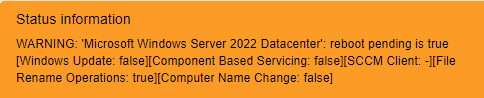
How filter out  PendingFileRenameOperations from NSCLIENT WIndows Pending Reboot check?

it’s always True.


Best answer by Flo

Hello,


If you want to avoid status “WARNING” for “File Rename Operations”, but keep a “WARNING” in another cases, just modify the service model “Pending Reboot” and replace :


%{RebootPending} =~ /true/i


By :


%{RebootPending} =~ /true/i && (%{WindowsUpdate} =~ /true/i || %{ComponentBasedService} =~ /true/i || %{SCCMClient} =~ /true/i || %{ComputerNameChange} =~ /true/i)

2 replies

Forum|alt.badge.img
  • Steward *
  • Answer
  • December 7, 2023

Hello,


If you want to avoid status “WARNING” for “File Rename Operations”, but keep a “WARNING” in another cases, just modify the service model “Pending Reboot” and replace :


%{RebootPending} =~ /true/i


By :


%{RebootPending} =~ /true/i && (%{WindowsUpdate} =~ /true/i || %{ComponentBasedService} =~ /true/i || %{SCCMClient} =~ /true/i || %{ComputerNameChange} =~ /true/i)


Forum|alt.badge.img+7
  • Author
  • Steward **
  • December 9, 2023

yes, basically i’ll have warning status on all events but not for file rename and this the final goal.


it’s not clean because i’ll have the message: pending reboot TRUE


but at moment i like this solution. 


i’ll try to edit nsclient excluding every check related to file rename.


Thank you for your answer (i marked it as best answer), i appreciated your help.

