Solved

Cannot get partition information [centreon@centreon-central ~] error

  • March 23, 2025
  • 6 replies
  • 135 views

Forum|alt.badge.img+2

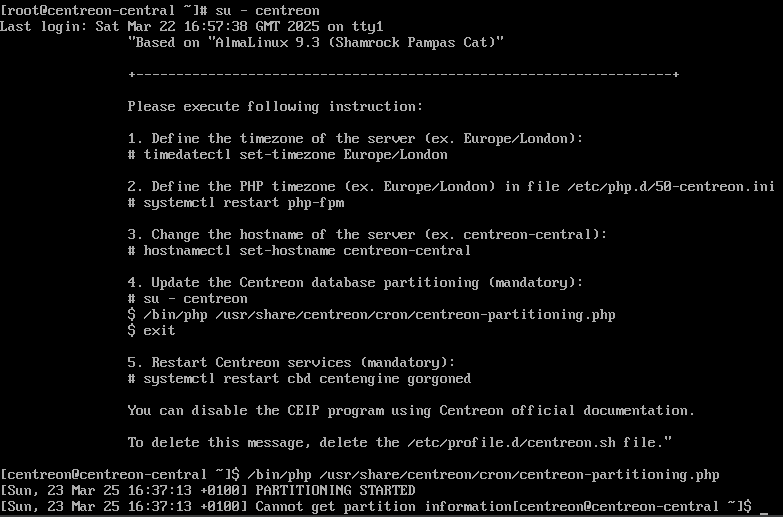
As mentioned, I got this error while trying to do step 4 of the server instructions (step 3.5 in the official documentation: Add a MariaDB table partition. This step is mandatory. Your Centreon server will not work if this isn't done.).

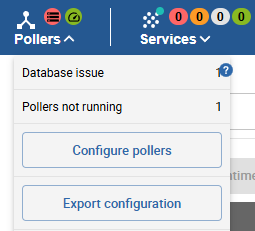
I can connect to the web console, but I see a database issue/poller not running:
 

Best answer by gugupe

Instead of using the ready-to-use virtual machine, I went on to install Centreon in production.

6 replies

Forum|alt.badge.img+2
  • Author
  • Steward *
  • March 25, 2025

I forgot to mention that I didn’t get the Centreon setup wizard after logging in on the web interface.


Forum|alt.badge.img+2
  • Author
  • Steward *
  • March 28, 2025

Solved.


fgbetokpanou
Centreonian
Forum|alt.badge.img+11
  • Centreonian
  • March 28, 2025

Hi ​@gugupe, glad to hear you were able to resolve the issue! Would you mind sharing with the community how you did it? It could be really helpful for someone facing the same problem in the future. Thank you!


Forum|alt.badge.img+2
  • Author
  • Steward *
  • Answer
  • March 31, 2025

Instead of using the ready-to-use virtual machine, I went on to install Centreon in production.


ponchoh
Centreonian
Forum|alt.badge.img+14
  • Centreonian
  • March 31, 2025

Virtual machines are only suitable to use Centreon IT-100 or to test the solution.


https://docs.centreon.com/docs/installation/installation-of-a-central-server/using-virtual-machines/


Forum|alt.badge.img+2
  • Author
  • Steward *
  • April 1, 2025

That was the documentation I consulted for the Centreon installation after acquiring the IT-100 licence. Thanks anyway.