Question

Centreon 25.10 - Performance Graph filter not working

  • November 20, 2025
  • 3 replies
  • 10 views

Forum|alt.badge.img+2

Hello,

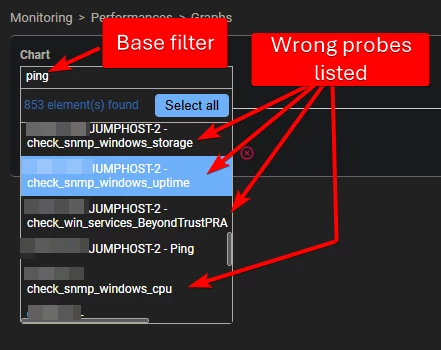
Since the upgrade from 23.04 to 25.10, we cannot filter the performance graph list.

When we type the beginning of a research (e.g ping) → looks like it does a filter and then shows all our existing probes.

Are we the only one with this issue ?

Best Regards,

3 replies

Forum|alt.badge.img+2
  • Author
  • Steward *
  • November 27, 2025

Anyone ?


Forum|alt.badge.img+2
  • Author
  • Steward *
  • December 2, 2025

Are we the only one using performance graph to show multiples hosts / services and helping for debugs (like loss of packets → checking multiple hosts on the same view to have the same timeline) ?

And so on, we can’t do that because we have around 1.5K services → Really hard to find the right one when the filter isn’t working and listing all the items.


Best Regards,


vcoum
Centreon Lord Commander
Forum|alt.badge.img+13
  • Centreon Lord Commander
  • December 5, 2025

Hello,

After comparing with the 24.10 files, it seems the problem come from the centreon_performance_service.class.php file

Can you backup the file /usr/share/centreon/www/api/class/centreon_performance_service.class.php

cp /usr/share/centreon/www/api/class/centreon_performance_service.class.php /usr/share/centreon/www/api/class/centreon_performance_service.class.php.backup

And then edit the same file

At line ~45 change the function __construct() like this

    public function __construct()
{
parent::__construct();
$this->pearDBMonitoring = new CentreonDB('centstorage');
}

only the line parent::__construct(); is missing. Just add it befor the $this

Then reload your performance graph page and try the filter

If it doesn’t works, rollback with the backup file

Hope it helps