


We are excited to introduce the CIM MCP Server, an open-source project that brings the power of AI assistants directly to your Centreon Infra Monitoring (CIM) platform.
Available on GitHub, this integration opens a new way to interact with your monitoring data — using plain, natural language.
What Is MCP?
Model Context Protocol (MCP) is an open standard that allows AI assistants — such as ChatGPT, Claude, or Mistral Le Chat — to connect to external tools and services in a structured, secure way. By exposing capabilities through an MCP server, any compatible AI assistant can discover and invoke those capabilities on your behalf, turning your conversational prompts into real actions on your infrastructure.
Centreon MCP Server in a Nutshell
The CIM MCP Server acts as a bridge between your favorite AI assistant and your CIM instance. It is built in Python using the FastMCP library and communicates with the Centreon REST API using a token-based authentication model (Application Token).
Key highlights:
- Open source — Apache 2.0 licensed, available on GitHub
- Compatible with all supported Centreon versions & editions — whether you are running Centreon Open Source, IT Edition, Business Edition, or MSP Edition
- Works on all platforms — both on-premises and Centreon Cloud deployments are supported
- AI-agnostic — integrates with ChatGPT, Mistral Le Chat, Claude Code, and any other MCP-compatible client
Features
The MCP server currently exposes 22 tools organized across six functional areas.
Keep an eye on your infrastructure
- Check the real-time status of your hosts and services, filtering by state, group, category, poller, and more.
- Get an instant count of how many resources are up, down, or in trouble, without digging through dashboards.
- Look back at what happened on a host or service recently — outages, notifications, downtimes, acknowledgements, and comments.
Manage your monitoring configuration
- Browse, create, update, and delete hosts, services, and their categories, groups, severities, and templates.
- Manage commands, time periods and monitoring servers (pollers).
- Push configuration changes to your pollers by generating or reloading them on demand.
React to incidents
- Acknowledge an alert, schedule a downtime, add a comment, or trigger an immediate check.
- Review current acknowledgements and downtimes, and cancel them when they're no longer needed.
Analyze performance
- Retrieve a service's metrics along with their current values and warning/critical thresholds.
Tools
Resource Monitoring
list_monitoring_resources: List hosts and services with their real-time status.list_monitoring_entities: List host groups, service groups, or monitoring servers.count_monitoring_resources_by_status: Count hosts or services by status.get_host_timeline: Get the recent event history of a host.get_service_timeline: Get the recent event history of a service.
Configuration
list_configurations: List configured hosts, services, and related entities.create_configuration: Create a new configuration entity.update_configuration: Update an existing configuration entity.delete_configurations: Delete one or more configuration entities.manage_monitoring_server_configurations: Generate or reload poller configurations.
Monitoring Actions
list_monitoring_actions: List current acknowledgements or downtimes.set_monitoring_actions: Acknowledge, schedule a downtime, comment, or trigger a check.cancel_monitoring_actions: Cancel acknowledgements or downtimes.
Metrics
get_service_metrics: Get a service's current metric values and thresholds.
Supported AI Assistants
The server exposes a standard HTTP/MCP endpoint, making it compatible with any MCP-capable client. The repository provides step-by-step integration guides for:
- Claude Code
- ChatGPT
- Mistral Le Chat
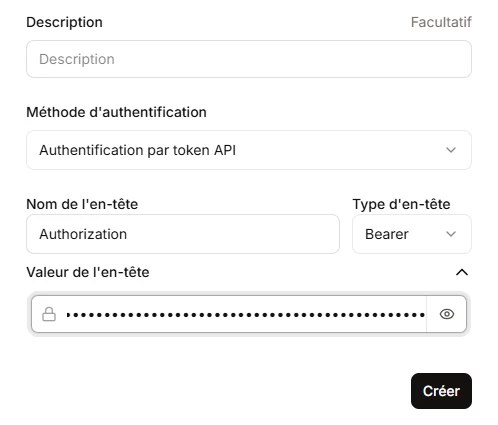
Any other MCP-compatible assistant can connect in the same way by pointing to the server URL and providing the Centreon API token in the centreon-api-token header.
Deployment
The server is designed to be easy to run, with two supported deployment options.
- Using uv (recommended for local use)
- Using Docker (recommended for production)
We welcome contributions, bug reports, and feature requests directly on GitHub. This is just the beginning — the MCP server is designed to grow with your needs and the evolving capabilities of AI assistants.
Feel free to share your needs and use cases.