Question

DHCP-Connection

  • October 23, 2023
  • 8 replies
  • 177 views

Forum|alt.badge.img+6

Hello,

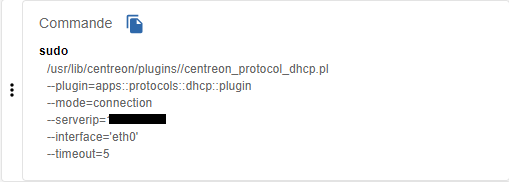
I'm trying to set up the DHCP-Connection plugin which requests the interface.
However, I get this error 
UNKNOWN: cannot get interface address: No such device
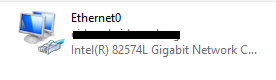
I put the name of the interface under Windows Ethernet0 but I get the same message.
I don't know where to find the correct name for the interface. Could you help me?

Best regards,


8 replies

ponchoh
Centreonian
Forum|alt.badge.img+14
  • Centreonian
  • October 23, 2023

👋 @sadekalom 


Can you do a successful call to (x.x.x.x) your DHCP server

dhclient eth0 -s x.x.x.x

side note

https://learn.microsoft.com/en-us/windows-server/troubleshoot/troubleshoot-problems-on-dhcp-server


Forum|alt.badge.img+6
  • Author
  • Steward **
  • October 24, 2023

👋 @sadekalom 


Can you do a successful call to (x.x.x.x) your DHCP server

dhclient eth0 -s x.x.x.x

side note

https://learn.microsoft.com/en-us/windows-server/troubleshoot/troubleshoot-problems-on-dhcp-server

hello @ponchoh thank you for your response, i tried this command from centreon poller to dhcp server.

i got this 


Forum|alt.badge.img+2
  • Steward *
  • October 24, 2023

Hello,

You should type “ip addr” to have the good device name.


Forum|alt.badge.img+6
  • Author
  • Steward **
  • October 24, 2023

Hello,

You should type “ip addr” to have the good device name.


The DHCP server is a Windows VM


Forum|alt.badge.img+6
  • Author
  • Steward **
  • October 24, 2023

Hello,

You should type “ip addr” to have the good device name.


The DHCP server is a Windows VM

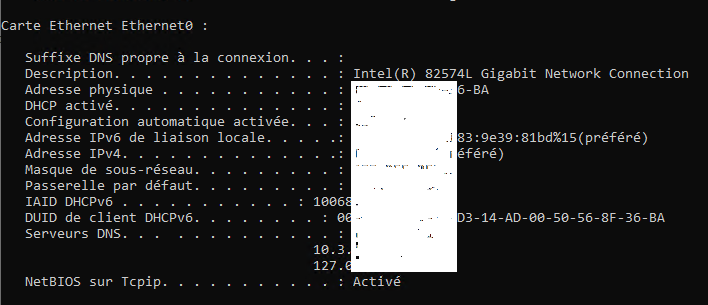
i did “ipconfig /all”

what name to set instead of eth0?


Forum|alt.badge.img+2
  • Steward *
  • October 24, 2023

It might be Ethernet0, but I’m not sure.

I think it could also be the ethernet (or virtual ethernet) device on your central centreon server, that’s why I thought about the command ip addr ;)


Forum|alt.badge.img+6
  • Author
  • Steward **
  • October 24, 2023

It might be Ethernet0, but I’m not sure.

I think it could also be the ethernet (or virtual ethernet) device on your central centreon server, that’s why I thought about the command ip addr ;)

already tried “ethernet0” got the same message


ponchoh
Centreonian
Forum|alt.badge.img+14
  • Centreonian
  • October 24, 2023

Hi, the command 

`ip a`

from the central should give you the correct eth