Question

Getting DNS zone expiration

  • June 11, 2026
  • 3 replies
  • 13 views

Forum|alt.badge.img+8

Hello.

Is there a plugin that can be used to get the DNS zone expiration from SOA?

I have tried with the DNS Service connector, using --mode=request --search-type='SOA' but it doesn’t show the complete SOA. With --verbose or --debug the result is the same, only the response time.

Regards

3 replies

mgarde
Centreonian
Forum|alt.badge.img
  • Centreonian
  • June 17, 2026

Hello,

At the moment, there’s no such plugin to check expiration of a zone.
The “DNS Service” plugin only performs availibility/performance checks on a DNS server.


Forum|alt.badge.img+8
  • Author
  • Steward ***
  • June 29, 2026

@mgarde

Thanks. I’ll propose it in the Ideas.

Regards.


Forum|alt.badge.img+17
  • Centreon Lord Commander
  • July 15, 2026

Hello

there is a non-native centreon way, this uses an old bash check, still working today, and creating your own command check and template

you can use this bash script 

monitoring-plugin-check_domain/check_domain.sh at master · glensc/monitoring-plugin-check_domain · GitHub

step 1 : download and put that bash file “check_domain.sh” in the $USER1$ folder (you’ll find that variable in configuration/poller/ressources, for me it’s /usr/lib64/nagios/plugins) and don’t forget to chmod +x

step 2 : install the “whois” package (apt or yum)

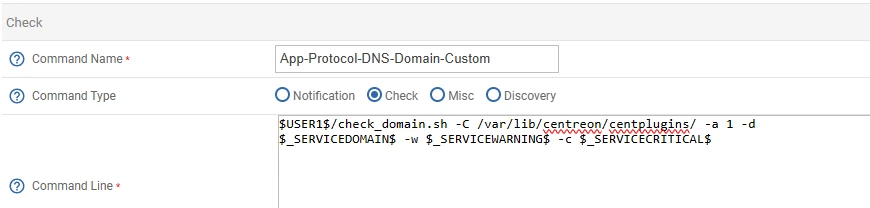
step 3 : create a new command in the “Configuration / Command / Checks” menu, I use :

  • NAME = App-Protocol-DNS-Domain-Custom
  • Command Type = Check
  • Command Line = $USER1$/check_domain.sh -C /var/lib/centreon/centplugins/ -a 1 -d $_SERVICEDOMAIN$ -w $_SERVICEWARNING$ -c $_SERVICECRITICAL$
  •  

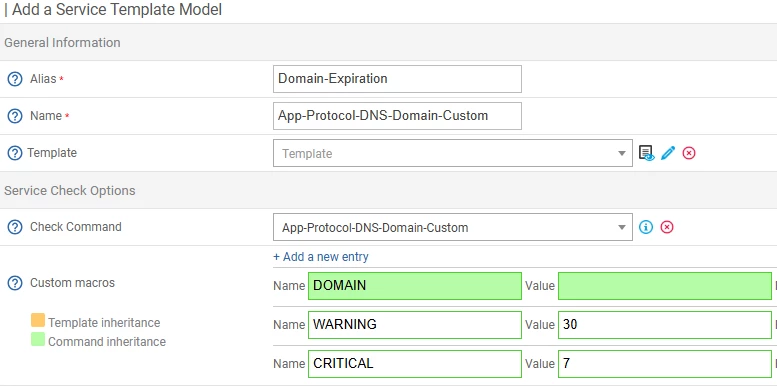
Step 4 : Create a service Template called “App-Protocol-DNS-Domain-Custom” with an alias, I chose “Domain-Expiration

  • choose the generic active service custom as a base template
  • use the check command “App-Protocol-DNS-Domain-Custom” 
  • set default values to warning and critical
  • I would advise to set the “normal check interval” to a few hours, 240 = 4 hours, no need to hammer the whois queries
  •  


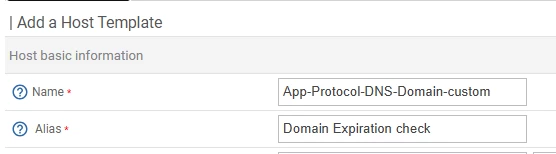
Step 5 : create a host template

just a name and alias

and add a relation to the service template

(notice I didn’t use a base host template)


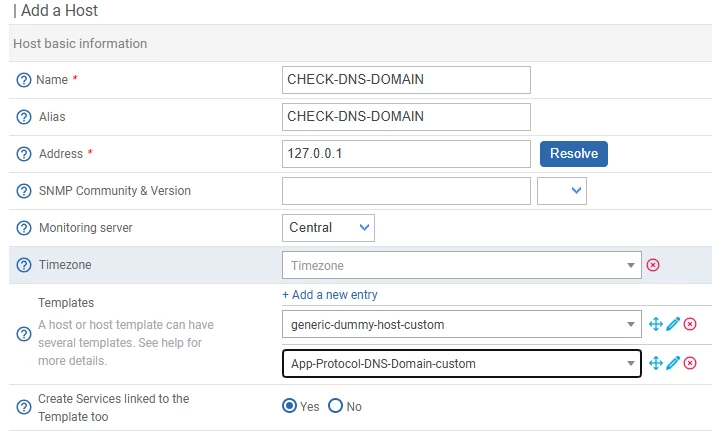
Final step, 

create a host, I advise using the base template “dummy-host-custom”, this will have a host that does nothing and allow you to attach templates

you can next go to the services of this host

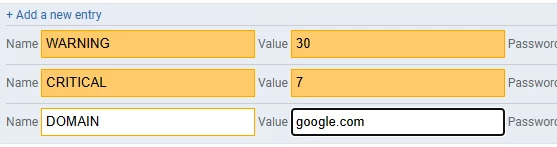
and setup your domain to check


result:

alternatively, if you have multiple domain to check, you could simply duplicate rename the service and have the domain name in the service allowing you a single “host” with multiple dns domain checked


you can stop at step 4, and simply create new services based on that template on any host you want