Question

Issue with Proxmox VE Monitoring via Centreon: Authentication Failure (401) and Host Status Undetermined

  • January 15, 2026
  • 5 replies
  • 39 views

Forum|alt.badge.img

Hello everyone,
I’m trying to monitor Proxmox VMs using Centreon with the Proxmox VE Rest API plugin. I’ve followed the official documentation as well as the steps described on these pages:

Centreon Plugin Packs Documentation : https://docs.centreon.com/pp/integrations/plugin-packs/procedures/virtualization-proxmox-ve-restapi/
Proxmox VE Rest API Plugin Procedure : https://docs.centreon.com/docs/monitoring/pluginpacks/#checking-the-monitoring-procedure

I’ve configured the plugin with the correct credentials and macros, but I’m facing two issues:


When I run the plugin manually or through Centreon, I get the following error:
UNKNOWN: 401 authentication failure

I also installed the Proxmox VE connector directly from Centreon and configured my host using the provided template. However, when I check the host availability, it shows 100% undetermined.


I’m wondering if this could be related to:

the realm (pam vs pve),
SSL settings,
or something else.

Another point: the VM.monitoring command no longer exists on Proxmox, which makes me question whether the documentation is up to date.
Has anyone encountered this issue before? Any advice or troubleshooting steps would be greatly appreciated.
Thanks in advance!

5 replies

ponchoh
Centreonian
Forum|alt.badge.img+14
  • Centreonian
  • January 22, 2026

Hello,


Realm for sure, SSL possible mainly if it is self signed. Also, are you using any sort of second factor on the account you are using?


ponchoh
Centreonian
Forum|alt.badge.img+14
  • Centreonian
  • January 23, 2026

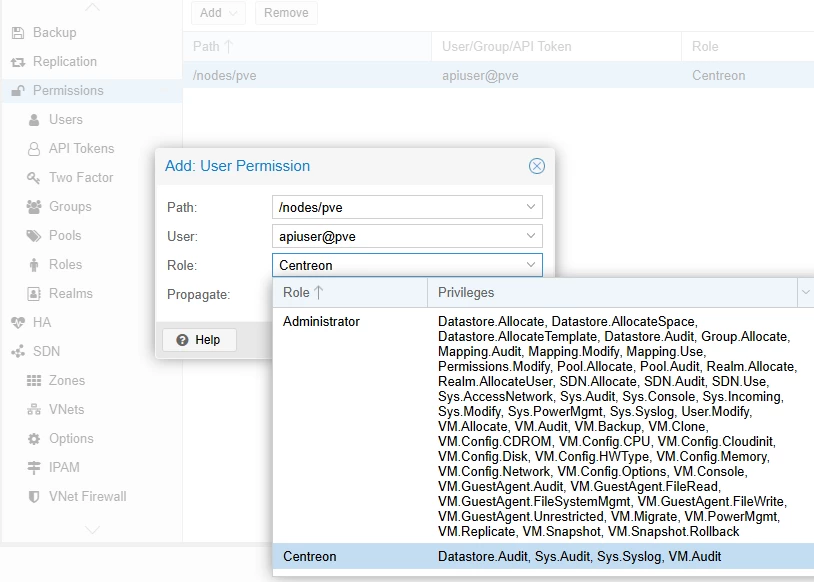
Play around with the roles.


ponchoh
Centreonian
Forum|alt.badge.img+14
  • Centreonian
  • January 26, 2026

command example, this should help 😀


sudo -u centreon-engine /usr/lib/centreon/plugins/centreon_proxmox_ve_restapi.pl --plugin apps::proxmox::ve::restapi::plugin --mode=node-usage --hostname=10.10.10.10 --api-username='apiuser' --api-password='api-password' --proto='https' --port='8006' --realm='pve' --insecure --filter-name='.*pve' --warning-cpu='80' --critical-cpu='90' --warning-memory='80' --critical-memory='90' --warning-swap='50' --critical-swap='70' --warning-fs='80' --critical-fs='90' 


ponchoh
Centreonian
Forum|alt.badge.img+14
  • Centreonian
  • January 26, 2026

vm.monitor has been dropped FYI

https://pve.proxmox.com/wiki/Roadmap#Proxmox_VE_9.1

  • Drop the VM.Monitor privilege and instead require the Sys.Audit privilege for basic access to the KVM monitor.

    Commands besides basic informational commands require the Sys.Modify privilege, and some commands are restricted to the root user.


Forum|alt.badge.img
  • Steward *
  • February 17, 2026

Could someone please help me with the correct way to use an API Token in Centreon for Proxmox?

Since my Proxmox node (pve01) is publicly accessible, disabling 2FA is not an option for security reasons. Therefore, using an API Token is the only viable method for monitoring.


I have already verified the token via curl, and it works perfectly: 

curl -k -H 'Authorization: PVEAPIToken=monitoring@pve!monitoring=*****'      https://pve01.bonebunny.de:8006/api2/json/nodes
{"data":[{"status":"online","mem":78571642880,"disk":4637851648,"id":"node/pve01","level":"","uptime":513158,"node":"pve01","cpu":0.13607331296862,"ssl_fingerprint":"*****","maxdisk":776459649024,"type":"node","maxcpu":12,"maxmem":270141521920}]}


However, when using the apps::proxmox::ve::restapi::plugin (e.g., in node-usage or vm-usage mode), I keep getting an UNKNOWN: 401 authentication failure.

sudo -u centreon-engine /usr/lib/centreon/plugins//centreon_proxmox_ve_restapi.pl \
--plugin apps::proxmox::ve::restapi::plugin \
--mode=node-usage \
--hostname=pve01.example.com \
--api-username='monitoring' \
--api-password='***** \
--proto='https' \
--port='8006' \
--ssl-opt='SSL_verify_mode => SSL_VERIFY_NONE' \
--filter-name='.*' \
--warning-cpu='80' \
--critical-cpu='90' \
--warning-memory='80' \
--critical-memory='90' \
--warning-swap='50' \
--critical-swap='70' \
--warning-fs='80' \
--critical-fs='90'
UNKNOWN: 401 authentication failure 

I have tried several combinations of --api-username, --api-password, and --realm, but none seem to work. How should the arguments be formatted specifically for API Tokens to avoid the plugin trying to fetch a session ticket?

Thanks in advance for your help!"