
Solved

Local Contact / User - no password field

  • February 3, 2026
  • 4 replies
  • 55 views

Forum|alt.badge.img+8

Hi, 


currently i run on the last 24.10.18 .

i want to change the password for a local user.. but there is no password field ?

no SAML/or WEB SSO , standard login with LDAP user an local user 
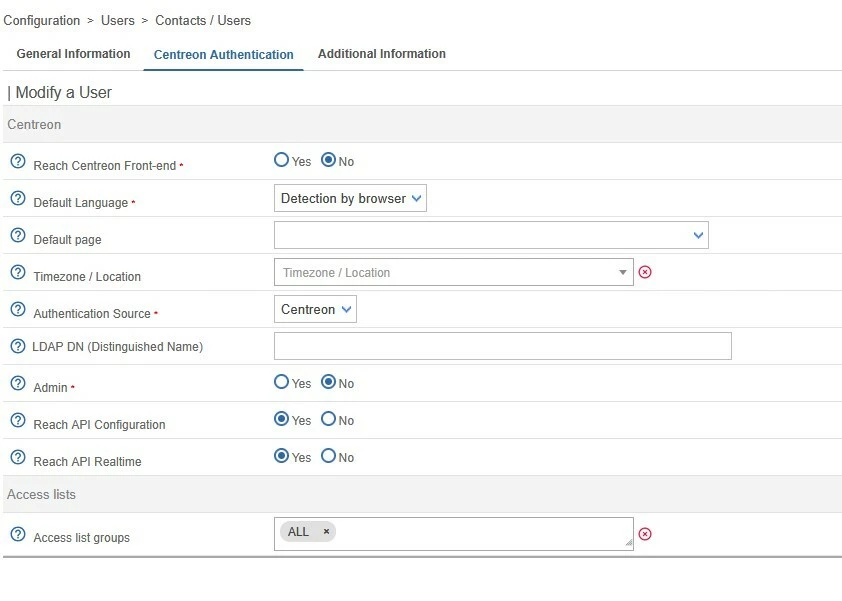
what can i do ? it is a BUG ?

Best answer by rbignotti

Hello ​@ahartung,

This is a choice that has been made for security reasons.

See the release note: https://docs.centreon.com/docs/24.10/releases/centreon-os/#241015

  • [Authentication] When editing a contact, users authenticated by an IdP no longer see the password editing fields.

4 replies

Forum|alt.badge.img+8
  • Centreonian
  • Answer
  • February 5, 2026

Hello ​@ahartung,

This is a choice that has been made for security reasons.

See the release note: https://docs.centreon.com/docs/24.10/releases/centreon-os/#241015

  • [Authentication] When editing a contact, users authenticated by an IdP no longer see the password editing fields.

Forum|alt.badge.img+13
  • Builder **
  • February 9, 2026

I agree with you ​@ahartung  it’s a horrible design choice, and a breaking change.

Finally , you have an admin account, who is not admin.


Forum|alt.badge.img
  • Steward *
  • February 19, 2026

I agree with you ​@ahartung  it’s a horrible design choice, and a breaking change.

Finally , you have an admin account, who is not admin.

+1


flex
Forum|alt.badge.img+1
  • Steward *
  • February 20, 2026

I also agree with ​@ahartung and ​@benoitp..

I think, if I have an admin account, authenticated with an Identity Provider, I should be able to create new users with a password, but without confirming my own password. Or in case you want to keep this extra level of security to re-authenticate: redo the authentication on my identity provider to confirm my authentication is still valid.