Solved

Monitoring a port

  • Apr 21, 2022 1:43 PM UTC
  • 13 replies
  • 2568 views

Forum|alt.badge.img+2

Hello,


I want to set up a service to monitor a specific port 5643 on Centreon 21.04.2 on one of my hosts. I just need to be alerted if it is up, or down. I’ve done some search's but haven’t come up with a way to do it.


Anyone got any tips or suggestions for me?


Thanks,

Steve Arnold

Best answer by Kriko

Hello @sarnold02 ,

Do not worry, we are to help you :)

You just need to fill:

  • PORT: the port that you want to test ;
  • WARNING: warning threshold in s (if you want to get a warning if the response time is above x s). You can set up 1 for 1s for example;
  • CRITICAL: critical threshold, could be 2 ;
  • EXTRAOPTIONS: In case you want to add other options from the plugin without recreate a new command :)

So basicaly, only the port could be enough for your need.


View original

13 replies

Forum|alt.badge.img+16
  • Steward **
  • Apr 21, 2022 3:15 PM UTC

Yo @sarnold02 ,

You can use the plugin apps::protocol::tcp::plugin like this:

/usr/lib/centreon/plugins/centreon_protocol_tcp.pl --plugin apps::protocols::tcp::plugin --mode response-time --hostname=127.0.0.1 --port=22
OK: Response time on port 22 is 0.002s | 'tcp.response.time.seconds'=0.002491s;;;0;

The plugin have a default threshold to alert you if the port is closed (see --help):

/usr/lib/centreon/plugins/centreon_protocol_tcp.pl --plugin apps::protocols::tcp::plugin --mode response-time --hostname=127.0.0.1 --port=23
CRITICAL: Connection status on port 23 is failed: error=Connection refused | 'tcp.response.time.seconds'=0.001444s;;;0;

You can find the documentation here: https://docs.centreon.com/pp/integrations/plugin-packs/procedures/applications-protocol-tcp/


Forum|alt.badge.img+2
  • Author
  • Steward *
  • Apr 21, 2022 5:40 PM UTC

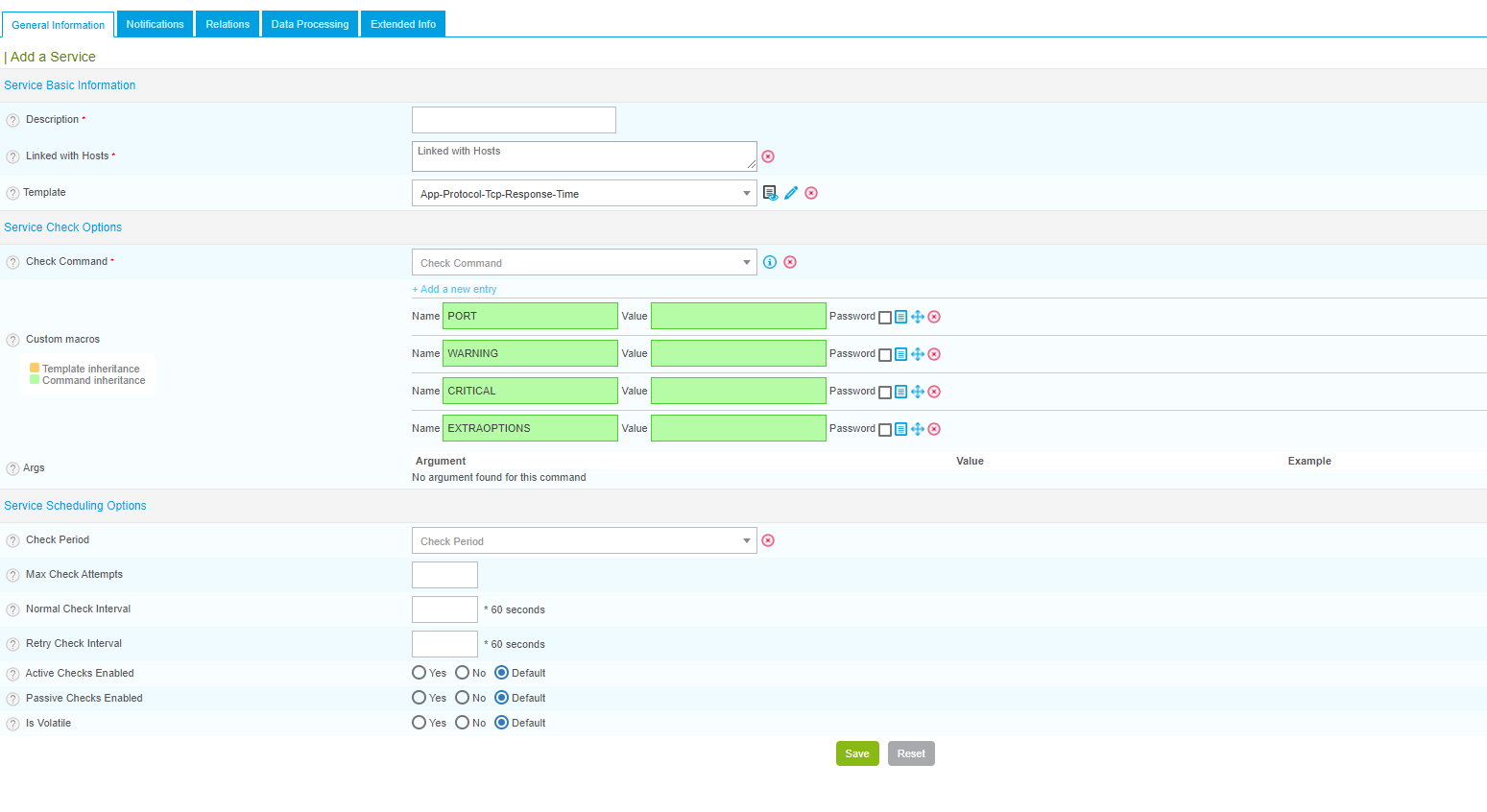
OK I’m a newbie and I’m working from the web interface. I think I have the right plug-in but I’m not sure how to fill in the values, here is what I have:


How do i fill this out?


Forum|alt.badge.img+16
  • Steward **
  • Answer
  • Apr 22, 2022 6:03 AM UTC

Hello @sarnold02 ,

Do not worry, we are to help you :)

You just need to fill:

  • PORT: the port that you want to test ;
  • WARNING: warning threshold in s (if you want to get a warning if the response time is above x s). You can set up 1 for 1s for example;
  • CRITICAL: critical threshold, could be 2 ;
  • EXTRAOPTIONS: In case you want to add other options from the plugin without recreate a new command :)

So basicaly, only the port could be enough for your need.


Forum|alt.badge.img+2
  • Author
  • Steward *
  • Apr 22, 2022 12:51 PM UTC

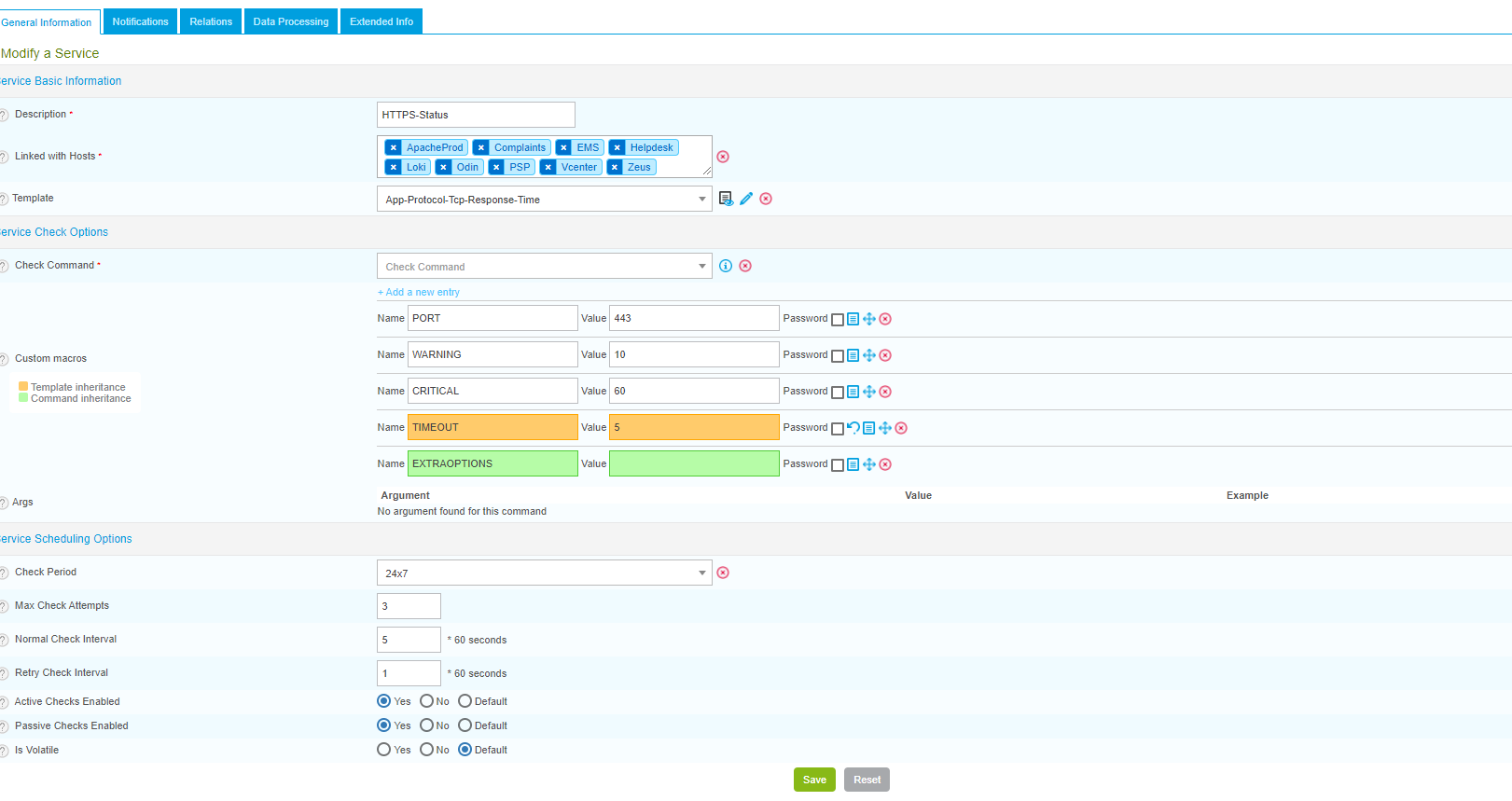
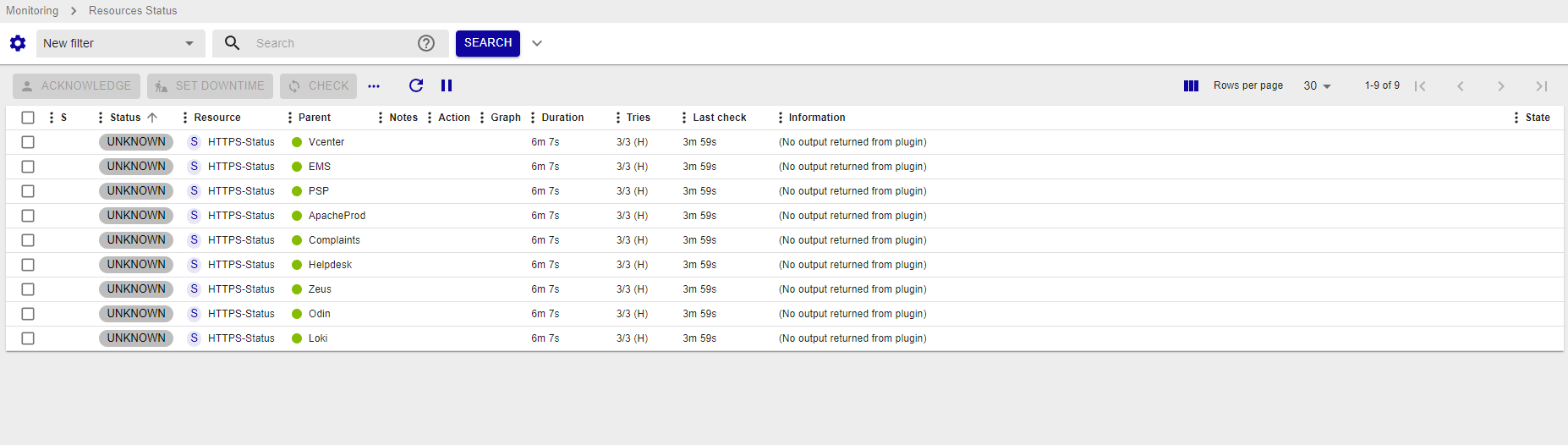
hmm I though that I had it working, but when I created it I get errors:


Any Ideas?


Forum|alt.badge.img+16
  • Steward **
  • Apr 22, 2022 12:54 PM UTC

The plugin is installed on the central/poller ?


Forum|alt.badge.img+2
  • Author
  • Steward *
  • Apr 22, 2022 12:57 PM UTC

yes, I only have 1 poller.


Forum|alt.badge.img+2
  • Author
  • Steward *
  • Apr 25, 2022 1:58 PM UTC

when I run the command: 

/usr/lib/centreon/plugins//centreon_protocol_tcp.pl --plugin=apps::protocols::tcp::plugin --mode=response-time --hostname='128.192.56.60' --port='443' --warning='10' --critical='60' --timeout='5'

I get the Error: -bash: /usr/lib/centreon/plugins//centreon_protocol_tcp.pl: No such file or directory

So I guess I didn’t get The TCP Plug-in installed.

When I run: yum install centreon-plugin-Applications-Protocol-Tcp

Package                                      Arch      Version                         Repository                 Size
========================================================================================================================
Installing:
centreon-plugin-Applications-Protocol-Tcp noarch 20220414-091353.el7.centos centreon-stable-noarch 37 k

Transaction Summary
========================================================================================================================
Install 1 Package

Total size: 37 k
Installed size: 220 k
Is this ok [y/d/N]: d
Is this ok [y/d/N]: y
Downloading packages:
warning: /var/cache/yum/x86_64/7/centreon-stable-noarch/packages/centreon-plugin-Applications-Protocol-Tcp-20220414-091353.el7.centos.noarch.rpm: Header V4 RSA/SHA1 Signature, key ID 3fc49c1b: NOKEY
Retrieving key from file:///etc/pki/rpm-gpg/RPM-GPG-KEY-CES


The GPG keys listed for the "Centreon open source software repository." repository are already installed but they are not correct for this package.
Check that the correct key URLs are configured for this repository.


Failing package is: centreon-plugin-Applications-Protocol-Tcp-20220414-091353.el7.centos.noarch
GPG Keys are configured as: file:///etc/pki/rpm-gpg/RPM-GPG-KEY-CES

Does that mean anything to you?


Forum|alt.badge.img+16
  • Steward **
  • Apr 25, 2022 2:01 PM UTC

Hola o/

I guess you may take a look to this documentation: https://docs.centreon.com/docs/security/key-rotation/#existing-installation


Forum|alt.badge.img+2
  • Author
  • Steward *
  • Apr 25, 2022 2:22 PM UTC

I followed those instructions, but i still get the same error:


 Failing package is: centreon-plugin-Applications-Protocol-Tcp-20220414-091353.el7.centos.noarch
 GPG Keys are configured as: file:///etc/pki/rpm-gpg/RPM-GPG-KEY-CES



Forum|alt.badge.img+16
  • Steward **
  • Apr 25, 2022 2:23 PM UTC

Let’s do something dirty and try --nogpgcheck to your yum command.


Forum|alt.badge.img+2
  • Author
  • Steward *
  • Apr 25, 2022 2:25 PM UTC

Your a genius! 


Thank you so much!


Forum|alt.badge.img+16
  • Steward **
  • Apr 25, 2022 3:29 PM UTC

You’re welcome :)


Forum|alt.badge.img+4
  • Steward **
  • Apr 28, 2025 12:23 PM UTC

Hi,

Checking TCP is ok, but how do i check an openvpn UDP port?


 /usr/lib/centreon/plugins//centreon_protocol_udp.pl  --plugin=apps::protocols::udp::plugin --mode=connection  --hostname=192.168.0.1 --port=1111


CRITICAL: Connection failed on port 1111


thanks,

Mathias

🤔