Question

Problem withe Export Confiugration Need to reload centengine to apply the change

  • May 30, 2023
  • 18 replies
  • 685 views

Forum|alt.badge.img+4

Hello,

I’ve a new Centreon 23.04, my issue is when i export the configuration on my Central, it’s doesn’t work :
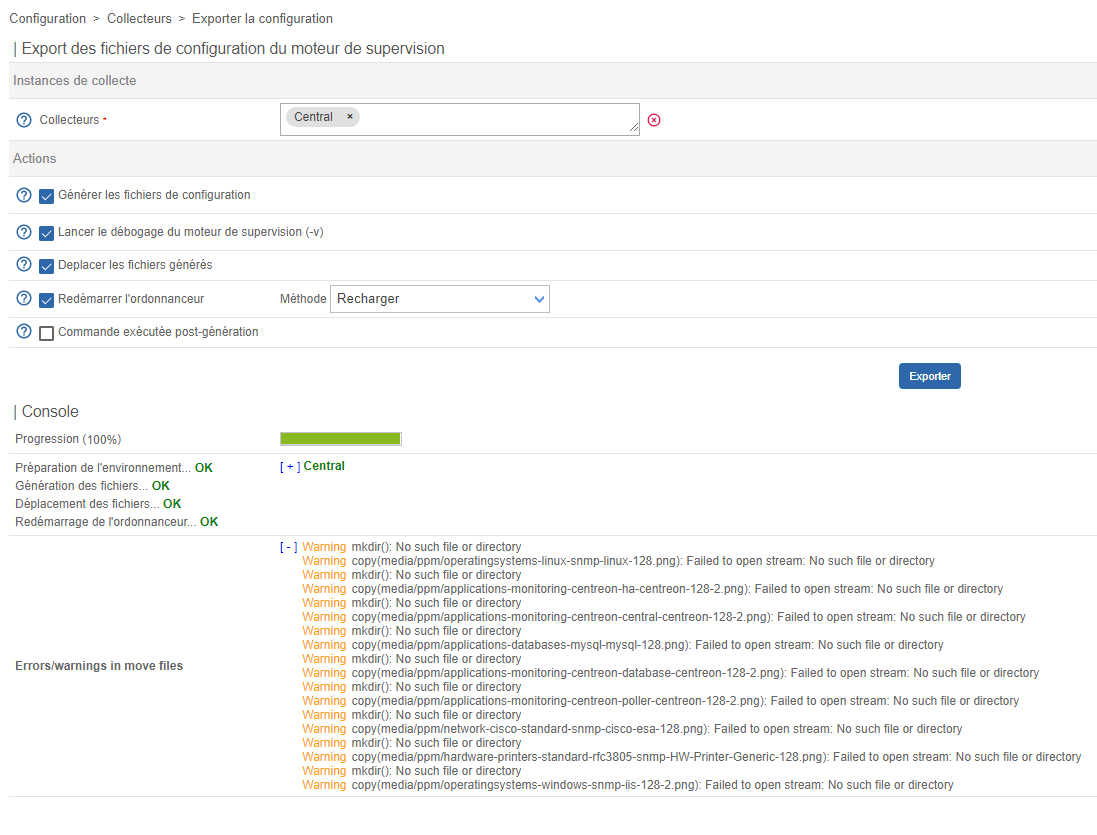
 

I need to reload the centengine service to apply the change :

#systemctl reload centengine.service


Anyone have faced same issue? Does somebody have an idea, please?


Thanks.

18 replies

ponchoh
Centreonian
Forum|alt.badge.img+14
  • Centreonian
  • May 30, 2023


Forum|alt.badge.img+4
  • Author
  • Steward *
  • May 30, 2023

ponchoh,

Thank's for your feedback.

The No such file or directory was fixed, by updated the Centreon web.

My issue is the export configuration isn't working. I need to reload the centengine to apply the changes.


Forum|alt.badge.img+4
  • Author
  • Steward *
  • July 7, 2023

Hello,


Issue was resolved. there are noexec restruction in sudoers file. Now i can export configuration by reload the centengine in GUI.

Thank’s


Forum|alt.badge.img+1
  • Steward *
  • August 25, 2023

Hello,


Issue was resolved. there are noexec restruction in sudoers file. Now i can export configuration by reload the centengine in GUI.

Thank’s

 Hello @Rich04 , I have just the exact problem of you, I cannot see any changes in my Centreon if I don’t restart the “centengine” service. Please could you kindly explain to me what did you do exactly to solve it? 


Thanks in advance,


Forum|alt.badge.img+1
  • Steward *
  • August 28, 2023

Hello all,

Can anyone help us with this issue?

Thanks in advance 🙂


Forum|alt.badge.img+4
  • Author
  • Steward *
  • August 28, 2023

Hello @Rufus43 

Check you sudoers file, if the centengine user is autorized to run cmd as root user and check the owner of directory /etc/cent* , eg. /etc/centreon-broker owner by  centreon-broker user


Forum|alt.badge.img+1
  • Steward *
  • August 29, 2023

Hello @Rufus43 

Check you sudoers file, if the centengine user is autorized to run cmd as root user and check the owner of directory /etc/cent* , eg. /etc/centreon-broker owner by  centreon-broker user

Hello @Rich04 ,

Are you sure that is it really necessary to do this?

In my case I’ve deployed a template with everyhing configured and directly from Centreon official website. It seems a bit strange to have to make these types of modifications in the “sudoers” file, it doesn't appear anywhere in the guide I've followed: https://docs.centreon.com/docs/installation/installation-of-a-central-server/using-virtual-machines/"

Thank you again 😊


Forum|alt.badge.img+4
  • Author
  • Steward *
  • August 29, 2023

Hello @Rufus43  ,

In My case i've an internal rules to block user sudo. I've deploy manually my server.


What'is exactly your issue? If you make any change (adding new host or service)  you should restart your poller to apply the change. The change is not take effet if you didn't restart the poller. It’s not an issue , it's normal behavior. 


Forum|alt.badge.img+1
  • Steward *
  • August 29, 2023

Hello @Rufus43  ,

In My case i've an internal rules to block user sudo. I've deploy manually my server.


What'is exactly your issue? If you make any change (adding new host or service)  you should restart your poller to apply the change. The change is not take effet if you didn't restart the poller. It’s not an issue , it's normal behavior. 


Hello @Rich04 ,

My exactly issue is that when I do any change (add new host, disable host, modify any services, etc) it won’t be applied/showed after exporting the poller configuration and reloading it or restarting it (tried both with no luck) if I don’t restart after manually the service “centengine” from the server, command line.

I’ve been working with Centreon for many years and this isn’t a normal behavior 😅


Thank my friend!


Forum|alt.badge.img+4
  • Author
  • Steward *
  • August 29, 2023

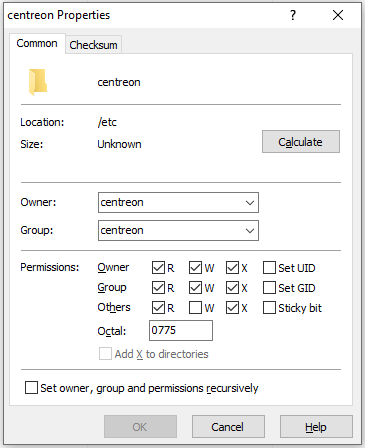
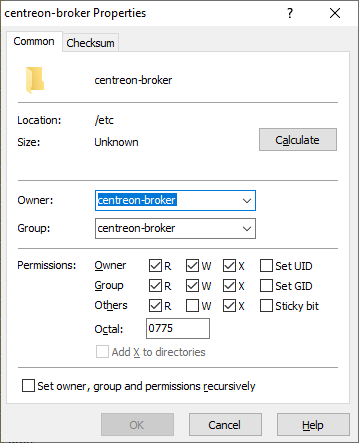
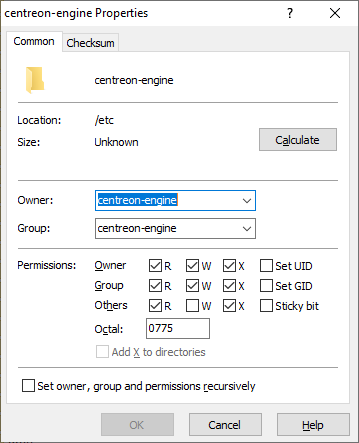
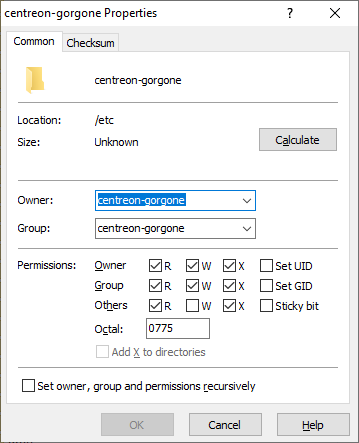
Check the owner and permission of those directory :

  •  /etc/centreon
  • /etc/centreon-broker
  •  /etc/centreon-engine
  • /etc/centreon-gorgone


Forum|alt.badge.img+1
  • Steward *
  • August 29, 2023

Check the owner and permission of those directory :

  •  /etc/centreon
  • /etc/centreon-broker
  •  /etc/centreon-engine
  • /etc/centreon-gorgone


Here you have the details @Rich04 , I didn’t make any modification about this, it’s the default configuration after deploying the VM template.

Thank you,


Forum|alt.badge.img+4
  • Author
  • Steward *
  • August 29, 2023

@Rufus43 

Ok, the directory permission is correct . Please, check the file owner and permission under the directory :

here an eg.

ls -l  /etc/centreon-engine/
total 464

-rw-rw-r--. 1 apache centreon-engine  321 22 août  17:14 plugins.json
-rw-rw-r--. 1 apache centreon-engine 1,5K 22 août  17:14 connectors.cfg
-rw-rw-r--. 1 apache centreon-engine  18K 22 août  17:14 commands.cfg
-rw-rw-r--. 1 apache centreon-engine 4,5K 22 août  17:14 centengine.cfg
-rw-rw-r--. 1 apache centreon-engine 4,4K 22 août  17:14 contacts.cfg

apache user owns files owner 


Forum|alt.badge.img+1
  • Steward *
  • August 29, 2023

@Rufus43

Ok, the directory permission is correct . Please, check the file owner and permission under the directory :

here an eg.

ls -l  /etc/centreon-engine/
total 464

-rw-rw-r--. 1 apache centreon-engine  321 22 août  17:14 plugins.json
-rw-rw-r--. 1 apache centreon-engine 1,5K 22 août  17:14 connectors.cfg
-rw-rw-r--. 1 apache centreon-engine  18K 22 août  17:14 commands.cfg
-rw-rw-r--. 1 apache centreon-engine 4,5K 22 août  17:14 centengine.cfg
-rw-rw-r--. 1 apache centreon-engine 4,4K 22 août  17:14 contacts.cfg

apache user owns files owner 

@Rich04  I think the problem is just that the options “reload” or “restart” in Centreon web interface isn’t working...but let’s find why 😅


-rw-rw-r--. 1 centreon-engine centreon-engine 4601 29 août  14:19 centengine.cfg
-rw-rw-r--. 1 centreon-engine centreon-engine 1088 29 août  14:19 commands.cfg
-rw-rw-r--. 1 centreon-engine centreon-engine 1521 29 août  14:19 connectors.cfg
-rw-rw-r--. 1 centreon-engine centreon-engine 1088 29 août  14:19 contactgroups.cfg
-rw-rw-r--. 1 centreon-engine centreon-engine 1088 29 août  14:19 contacts.cfg
-rw-rw-r--. 1 centreon-engine centreon-engine 1088 29 août  14:19 dependencies.cfg
-rw-rw-r--. 1 centreon-engine centreon-engine 1088 29 août  14:19 escalations.cfg
-rw-rw-r--. 1 centreon-engine centreon-engine 1088 29 août  14:19 hostgroups.cfg
-rw-rw-r--. 1 centreon-engine centreon-engine 1088 29 août  14:19 hosts.cfg
-rw-rw-r--. 1 centreon-engine centreon-engine 1088 29 août  14:19 hostTemplates.cfg
-rw-rw-r--. 1 centreon-engine centreon-engine 1088 29 août  14:19 meta_commands.cfg
-rw-rw-r--. 1 centreon-engine centreon-engine 1088 29 août  14:19 meta_host.cfg
-rw-rw-r--. 1 centreon-engine centreon-engine 1088 29 août  14:19 meta_services.cfg
-rw-rw-r--. 1 centreon-engine centreon-engine 1088 29 août  14:19 meta_timeperiod.cfg
-rw-rw-r--. 1 centreon-engine centreon-engine    2 29 août  14:19 plugins.json
-rw-rw-r--. 1 centreon-engine centreon-engine 1167 29 août  14:19 resource.cfg
-rw-rw-r--. 1 centreon-engine centreon-engine 1088 29 août  14:19 servicegroups.cfg
-rw-rw-r--. 1 centreon-engine centreon-engine 1088 29 août  14:19 services.cfg
-rw-rw-r--. 1 centreon-engine centreon-engine 1088 29 août  14:19 serviceTemplates.cfg
-rw-rw-r--. 1 centreon-engine centreon-engine 1088 29 août  14:19 severities.cfg
-rw-rw-r--. 1 centreon-engine centreon-engine 1088 29 août  14:19 tags.cfg
-rw-rw-r--. 1 centreon-engine centreon-engine 1088 29 août  14:19 timeperiods.cfg


Forum|alt.badge.img+4
  • Author
  • Steward *
  • August 29, 2023

@Rufus43 ,

Ok, apache isn’t owen’t owner of files. 

Try to change the files ownership :

  • chown apache:centreon-engine /etc/centreon-engine/*
  • chown apache:centreon-broker /etc/centreon-broker/*


Forum|alt.badge.img+1
  • Steward *
  • August 29, 2023

@Rufus43 ,

Ok, apache isn’t owen’t owner of files. 

Try to change the files ownership :

  • chown apache:centreon-engine /etc/centreon-engine/*
  • chown apache:centreon-broker /etc/centreon-broker/*


@Rich04 I’ve just done that (and restarted the services and even the server) and it’s not working, exactly the same issue: the reload or restart option in web interface seems not working…

Maybe it’s related with this issue? 

Because when I try to run this command I got this error:

[root@XXX~]# su - centreon-gorgone -s /bin/bash -c 'sudo systemctl restart centengine'
>>> /etc/sudoers.d/root: erreur de syntaxe near line 2 <<<
sudo: erreur d'analyse grammaticale dans /etc/sudoers.d/root aux environs de la ligne 2
sudo: aucune source sudoers valide n'a été trouvée, fin d'exécution
sudo: impossible d'initialiser le greffon de règles

But the file looks good (it’s by default):

password        ALL = (ALL)       NOPASSWD: ALL
Defaults:root \!requiretty

And the “sudo” tool/command is already installed...so I don’t know what else to try 🤔


Thanks a lot again for your efforts helping me.


Forum|alt.badge.img+4
  • Author
  • Steward *
  • August 29, 2023

Modify the file /etc/sudoers.d/root and remove \

password        ALL = (ALL)       NOPASSWD: ALL
Defaults:root \!requiretty

Its sould be :

password        ALL = (ALL)       NOPASSWD: ALL
Defaults:root !requiretty


Forum|alt.badge.img+1
  • Steward *
  • August 30, 2023

Modify the file /etc/sudoers.d/root and remove \

password        ALL = (ALL)       NOPASSWD: ALL
Defaults:root \!requiretty

Its sould be :

password        ALL = (ALL)       NOPASSWD: ALL
Defaults:root !requiretty

It worked like a charm @Rich04 !!!! finally you’ve found the issue!!! THANKS A LOT BUDDY, YOU ARE THE BEST 😀💪


Forum|alt.badge.img+4
  • Author
  • Steward *
  • August 30, 2023

Thank you for your feedbak 😀