

F.A.Q.

NSClient - How to filter on Windows Events Logs

  • December 6, 2021
  • 7 replies
  • 2307 views

sduret
Centreonian
Forum|alt.badge.img+13

Please note that the only procedures supported and maintained by Centreon are those published in the official documentation. If you have a question about this article, post it in the comments.


This article explains how to efficiently filter Windows events.


The command check_eventlog returns events from the windows Event log but needs to be filtered thoroughly to not overload the system and point at what matters to you.

By default, if you do not filter, the command can send back a significant number of messages

For instance this does not filter:

/usr/lib/nagios/plugins/check_centreon_nrpe -H 10.10.10.10 -p 5666 -t 60 -u -m 8192 -c check_eventlog -a 'top-syntax=${status}: ${count} ${problem_list}' 'detailsyntax=${source} ${id}' "warning=count>0" "critical=count>5"

CRITICAL: 15692 MSExchangeRepl 2155, MSExchange ADAccess 2114, MSExchange ADAccess 2114, …


Here are some of the most useful filters:

  • Event log to read (type of event)
  • Date
  • Severity of event
  • Source that generated the event
  • ID of the event 

You must use the filter "file" with one of these arguments to specify which Windows event log to query:

  • Application
  • Security
  • System

To filter on the severity, it is necessary to use "level" with one of the following arguments :

  • Information
  • Warning
  • Error
  • Critical


Example

Here is a sample command which allows to post the events which :

  • Came from the "Application" log
  • Happened less than one hour ago
  • Have a severity "error" or "warning"
  • Are not related to "MSExchange ADAccess" and "MSExchangeIS" sources

/usr/lib/nagios/plugins/check_centreon_nrpe -H 10.10.10.10 -p 5666 -t 60 -u -m 8192 -c check_eventlog -a "file=application" 'top-syntax=${status}: ${count} ${problem_list}' 'detailsyntax=${source} ${id}' "warning=count>0" "critical=count>5" "filter=written > -60m and level in ('error', 'warning') and source not regexp 'MSExchange ADAccess|MSExchangeIS'"

This will return an output such as:

CRITICAL: 162 MSExchangeRepl 3176, MSExchangeTransport 16019, MSExchangeRepl 2155, …


Centreon Support does not actively maintain knowledge articles. If you have questions or require assistance with an article, please create a case or post a comment below.

7 replies

Forum|alt.badge.img+3
  • Steward **
  • April 1, 2023

Hi guys, I need your expert help please...I created a check that should capture windows restart/reboot using the Event ID: 1074. Centreon should capture this event if it happens less than10 mins ago. However, it is still showing OK result even the machine is just restarted (within the 10 mins, and the check schedule is every 2 minutes). Can you please check the script below and advise what could be wrong?

/usr/lib64/nagios/plugins/check_centreon_nrpe3 -H 10.88.70.112 -p 10555 -t 60 -u -2 -P 8192 -n -c check_eventlog -a "file=System" "filter=written > -10m and level in ('Information') and id in (1074)" 'top-syntax=${status}: ${count} ${problem_list}' 'detail-syntax=${source} ${id}' "warning=count>0" "critical=count>5" unique=1


Would really appreciate if someone could point my mistake here.


Thanks a lot,

Crisanto


sduret
Centreonian
Forum|alt.badge.img+13
  • Author
  • Centreonian
  • April 3, 2023

Hi @crisantob 
Can you replace Information by information?

/usr/lib64/nagios/plugins/check_centreon_nrpe3 -H 10.88.70.112 -p 10555 -t 60 -u -2 -P 8192 -n -c check_eventlog -a "file=System" "filter=written > -10m and level in ('information') and id in (1074)" 'top-syntax=${status}: ${count} ${problem_list}' 'detail-syntax=${source} ${id}' "warning=count>0" "critical=count>5" unique=1

It should work


Forum|alt.badge.img+3
  • Steward **
  • April 3, 2023

Hello sduret,


It works! thanks a lot for your help :)


  • Crisanto

Forum|alt.badge.img+3
  • Steward **
  • October 20, 2023

Hello sduret,


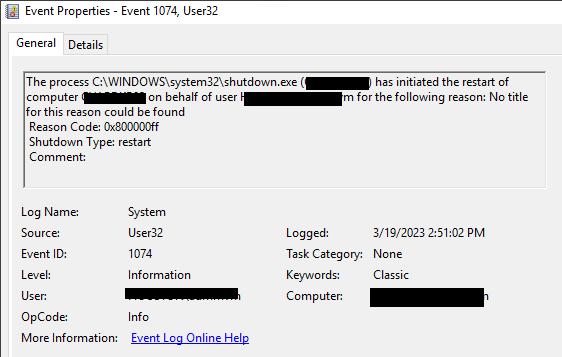
Is it possible to collect the message part of the event log and add it to the alert? This would be helpful to identify who/what restarted the computer.

"The process Explorer.EXE has initiated the restart of computer server01 on behalf of user user1 for the following reason: Other (Unplanned)

Reason Code: 0x5000000

Shutdown Type: restart

Comment:"

"The process C:\WINDOWS\Explorer.EXE (server01) has initiated the restart of computer serve01 on behalf of user user1 for the following reason: Other (Unplanned)

Reason Code: 0x5000000

Shutdown Type: restart


Thank you,

crisantob


sduret
Centreonian
Forum|alt.badge.img+13
  • Author
  • Centreonian
  • November 14, 2023

Hello @crisantob 

You can add ${message} in your detail-syntax option.

For instance:

/usr/lib64/nagios/plugins/check_centreon_nrpe3 -H XX.XX.XX.XX -u -2 -P 8192 -c check_eventlog -a 'top-syntax=${status}: ${count} ${problem_list}' 'detail-syntax=Source ${source} with message: ${message} ###' 'filter=id in (3007)'

WARNING: 2 Source EvntAgnt with message: Error opening event log file State. Log will not be processed. Return code from OpenEventLog is 87. ###, Source EvntAgnt with message: Error opening event log file Parameters. Log will not be processed. Return code from OpenEventLog is 87. ###|'problem_count'=2;0;0

The NSClient++ documentation is pretty clear and the keywords are all listed:

https://nsclient.org/docs/reference/windows/CheckEventLog/


Regards


Forum|alt.badge.img+3
  • Steward **
  • November 16, 2023

Thank you very much. This is exactly what I need! :)


ponchoh
Centreonian
Forum|alt.badge.img+14
  • Centreonian
  • November 16, 2023

The one and only Mr. @sduret