Question

Install Remote :1146 Table 'centreon.nagios_macro'

  • November 16, 2022
  • 4 replies
  • 162 views

sdouce
Forum|alt.badge.img+12

Hello ,


I try to install another one Remote Server on Azure.

Following Centreon doc , it’s impossible im stuck on step 7 during install .
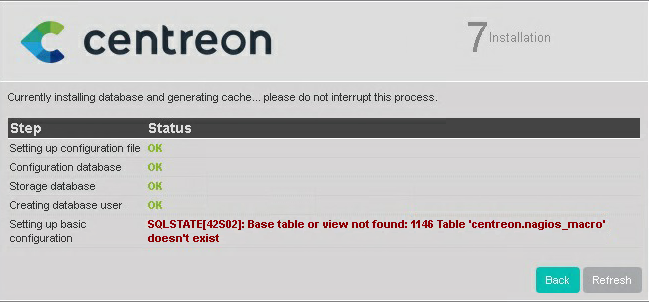
 

I tried to reinstall all but always the same pbm .

Any ideas ?

4 replies

lpinsivy
Centreonian
Forum|alt.badge.img+21
  • Centreonian
  • November 17, 2022

Hi @sdouce, which version of Centreon do you used?


Forum|alt.badge.img
  • Steward *
  • February 10, 2025

Hello,

I am currently encountering the same error on my centreon server in version 24.10 during installation. For your information, we want to set up a remote database. 


Has anyone found a solution ? 

Thanks a lot !


lpinsivy
Centreonian
Forum|alt.badge.img+21
  • Centreonian
  • February 11, 2025

Hi, this table is describe in the SQL file to create all needed tables;

https://github.com/centreon/centreon/blob/develop/centreon/www/install/createTables.sql#L1617

Can tou try to create it manually:

CREATE TABLE `nagios_macro` (
`macro_id` int(11) NOT NULL AUTO_INCREMENT,
`macro_name` varchar(255) DEFAULT NULL,
PRIMARY KEY (`macro_id`)
) ENGINE=InnoDB DEFAULT CHARSET=utf8;


Forum|alt.badge.img
  • Steward *
  • April 4, 2025

Hello,

I apologize for the late reply. Manually adding the table to the database solved the problem.
Thank you very much.

Have a nice day!