Solved

HTTP Collection mode - Filter possibility

  • March 12, 2024
  • 6 replies
  • 125 views

Forum|alt.badge.img+5
Good morning,We are in the process of setting up supervision via the HTTP-Collection plugin and we cannot figure out how to make a filter in the "selection_loop" section which allows a selection to be made when the field contains a defined character string .Example: "filter": "%(http.tables.request1) = ‘*chaine*’"

Thanking you for the help

Best answer by Nico

Hello,

For information, the answer is: "filter": "%(request1.type) =~ m/chaine/"

 And no : "filter": "%(http.tables.request1) =~ m/chaine/"

Regards

6 replies

Forum|alt.badge.img+17

hello

I’m a bit confused by your question so I will assume you want to do a filter with wildcards * and match a string with these wildcards


it’s not working like you think with wildcard like “*”, just imagine that the thing that run this is code/filtering is perl, so you would need to respect the syntax  perlre - Perl regular expressions - Perldoc Browser

$var =~ m/chaine/

in your case it would be something like : 

"filter": "%(http.tables.request1) =~ m/chaine/"

I have not tested it as I don’t have a collection on hand right now


Forum|alt.badge.img+5
  • Author
  • Steward **
  • March 14, 2024

Hello,

Unfortunately I had already tried this possibility. No error returned but no result returned.

Thanks


Forum|alt.badge.img+17

ah sorry to hear that

then you would need an answer from centreon directly on the syntax, I have not found detailed documentation except the example in the tutorials

I guess one way would be to do webquery with the filter and use the selection loop on the filtered data, but that may not be possible depending on your query.


the code from the plugin that evaluate and do the filtering is here : https://github.com/centreon/centreon-plugins/blob/ce07008b57ec519c3d73a8acf29487f19785e580/src/apps/protocols/http/mode/collection.pm#L1719

so it is really the perl function reval() so it should the using the perl syntax (but there is some stuff there that I don’t fully understand)


I also looked at the example in the tutorials, there is a thing that I’m not too sure about, but maybe you could try this syntax from this article : HTTP Collections tutorial - How to monitor an API | Community (centreon.com) (that’s for an api, maybe it doesn’t apply to your case)

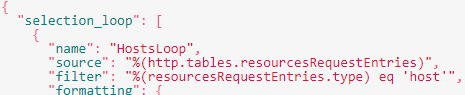
as you can see the source is “http.table.mytable

but the filter is on “mytable.myfield

not sure if this apply but in your example you didn’t put the field name to apply the filter on, and you have “http.tables” which is apparently not needed in the selection_loop (it was just an example you gave, so maybe you don’t use that exact syntax)


Forum|alt.badge.img+5
  • Author
  • Steward **
  • March 14, 2024
I also checked the documentation and found nothing either.I also tried to do a filter via the "parse" section with "path": "$.data[?(@.path =~ /STRING/i)]", and other tests but none work.So I opened a ticket this morning at Centreon.

Thanks


Forum|alt.badge.img+5
  • Author
  • Steward **
  • Answer
  • March 19, 2024

Hello,

For information, the answer is: "filter": "%(request1.type) =~ m/chaine/"

 And no : "filter": "%(http.tables.request1) =~ m/chaine/"

Regards


Forum|alt.badge.img+17

Hello

good to get a confirmation, please mark the question as “answered”  :)


best regards,

Christophe