


Question

Centreon 25.10.6 – Service macros prefixed with raw:: and not interpreted by centreon-engine (Oracle Linux 9.7)

  • February 5, 2026
  • 5 replies
  • 13 views

Forum|alt.badge.img+3

Description

Hello,

We are facing a critical issue after upgrading Centreon from 25.10.2 to 25.10.6 on a production platform.

Context

  • Centreon license: IT-100

  • Centreon version: 25.10.6 (upgrade from 25.10.2)

  • Architecture:

    • 1 × Centreon Central – Oracle Linux 9.7

    • 1 × Centreon Poller – Oracle Linux 9.7

  • Use case: Oracle Database supervision (standard Centreon Oracle plugins)

Issue observed

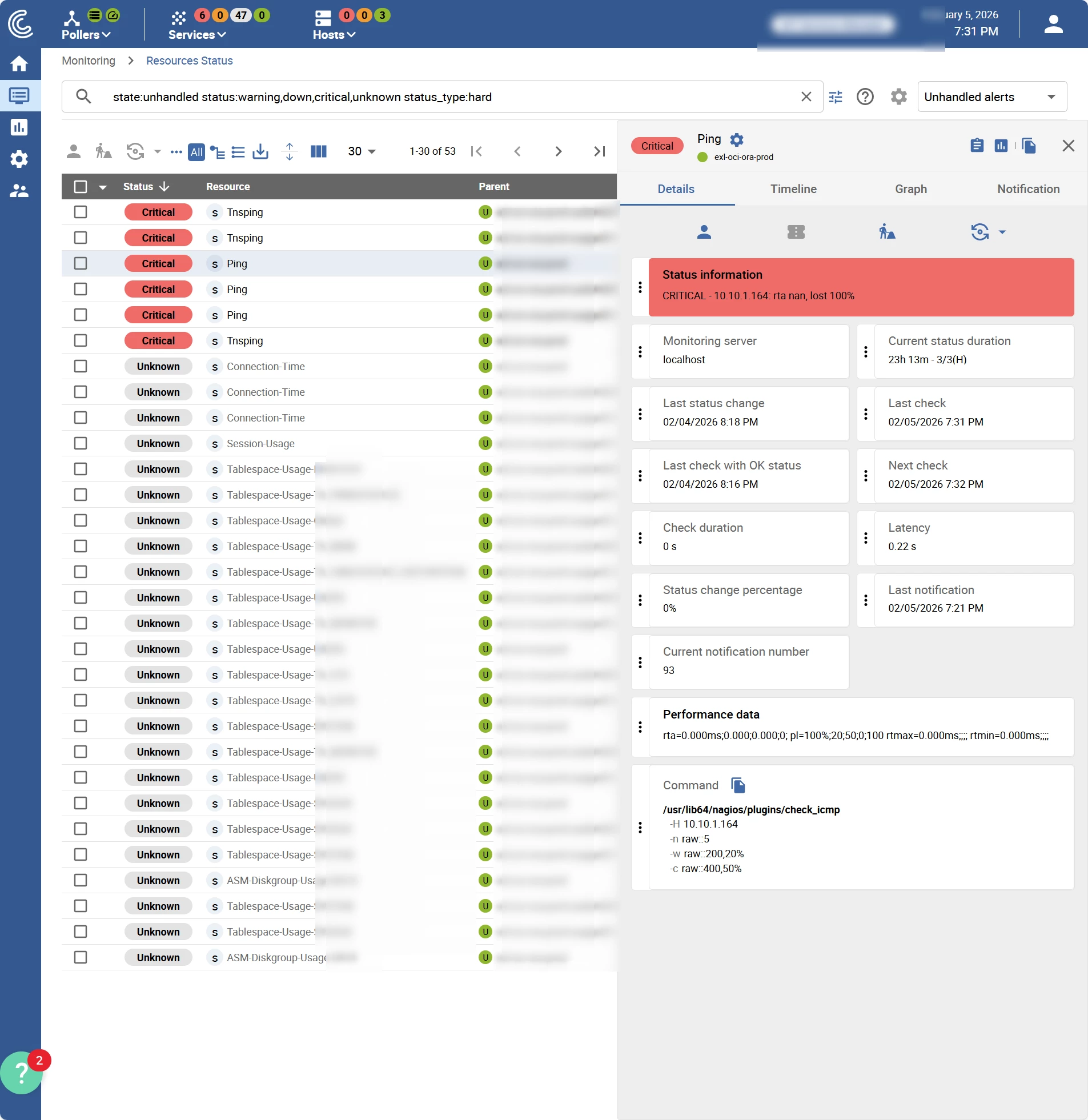
Since upgrading to 25.10.6, the supervision is completely broken.

All service macros are generated with the prefix raw::, for example:


raw::$_SERVICEOUTPUT$ raw::$_HOSTADDRESS$ raw::$_SERVICESTATE$

This raw:: prefix is not interpreted by centreon-engine, which causes:

  • Invalid command lines

  • Plugins failing to execute

  • Services stuck in CRITICAL / UNKNOWN

  • Global supervision failure (including basic checks like Ping)
What we verified / tried

  • The issue appeared immediately after the upgrade to 25.10.6

  • The same configuration was working correctly in 25.10.2

  • Rollback of centreon-engine on the poller → no change

  • The problem affects all services, not only Oracle-related ones

  • Configuration generation clearly shows macros prefixed with raw::

Impact

This issue blocks the entire monitoring platform.
If no workaround is found, we may have to rebuild the whole supervision platform from scratch, which is obviously not acceptable in production.

Question

  • Has anyone encountered a similar issue with raw:: macros in Centreon 25.10.6?

  • Is this a known bug, regression, or configuration change?

  • Is there any workaround, patch, or recommended fix?

Any feedback or guidance would be greatly appreciated.

Thanks in advance.

5 replies

fmattes
Centreonian
Forum|alt.badge.img+10
  • Centreonian
  • February 6, 2026

Hi,

raw:: prefixes are exported only on “encryption ready” pollers, which should be able to understand them.

Which version of centreon-engine are you using on poller ? 

Is the file /etc/centreon-engine/engine-context.json present and not empty ?


Forum|alt.badge.img+3
  • Author
  • Steward **
  • February 6, 2026

The file is empty on poller.

Where is the configuration of this option in Centreon Web interface, to disable it ?


fmattes
Centreonian
Forum|alt.badge.img+10
  • Centreonian
  • February 6, 2026

Thanks for your answer,

Which version of centreon-engine are you using on poller ? 

Did you followed this step during poller migration procedure ? (from 24.10 to 25.10)

/usr/share/centreon/bin/writeEngineSecrets.sh <CENTRAL_URL> <API_ACCOUNT> <PASSWORD>

Can you re-execute it and restart centreon-engine ?


If it doesn’t solve your problem : 


Disable encryption

There is no option in web UI to disable encryption.

Please do the following 

  • delete /etc/centreon-engine/engine-context.json on poller and restart engine, then generate the configuration.
  • if it doesn’t works, execute this query in database (centreon_storage)
    • update instances SET is_encryption_ready = 0 WHERE name = '<poller name>';​​

Tell me if it helps


Forum|alt.badge.img+3
  • Author
  • Steward **
  • February 6, 2026

Thx for your reply.

I see the command `/usr/share/centreon/bin/writeEngineSecrets.sh <CENTRAL_URL> <API_ACCOUNT> <PASSWORD>` in documentation, but is not possible in my case, because the Centreon Central and the Centreon Poller are not in the same network segment.


Or the network flow 443 between the Centreon poller and Centreon Central, is not open.

And this network flow is not mandatory to the version Centreon 24.10, I can’t ask it easily to the network team to open it without security reason.


fmattes
Centreonian
Forum|alt.badge.img+10
  • Centreonian
  • February 6, 2026

In your case, i suggest to copy the key file manually from Central to Poller.

File is /etc/centreon-engine/engine-context.json, for both.

Then, put correct rights on poller : 

chmod 660 /etc/centreon-engine/engine-context.json

chown centreon-engine:centreon-engine /etc/centreon-engine/engine-context.json


Then, restart centreon-engine