Solved

centreon_vmware.json is empty after every reload or restart poller(s) [Centreon 24.10.3]

  • January 6, 2025
  • 6 replies
  • 648 views

Forum|alt.badge.img+1

[sysop@centreon ~]# ls -la /etc/centreon/

drwxrwxr-x.   4 centreon centreon  274 Jan  5 11:04 .
drwxr-xr-x. 118 root     root     8192 Jan  5 09:19 ..
-rw-r-----.   1 apache   apache   1277 Nov 24 09:28 centreon.conf.php
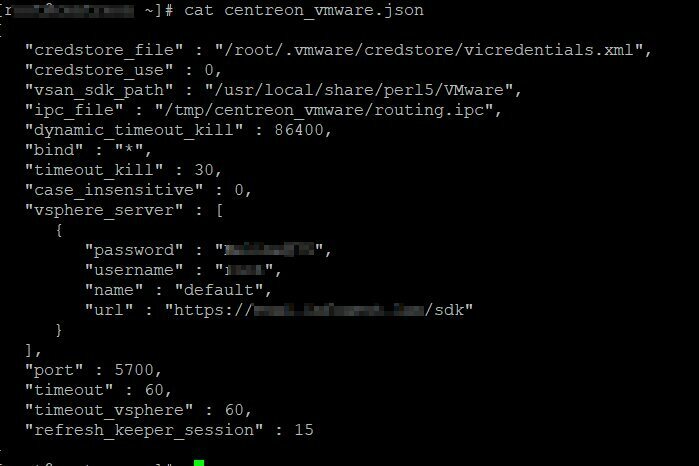
-rw-rw-r--.   1 centreon centreon  590 Jan  4 06:44 centreon_vmware.json
-rw-rw-r--.   1 centreon centreon  590 Jan  4 06:44 centreon_vmware.json.backup
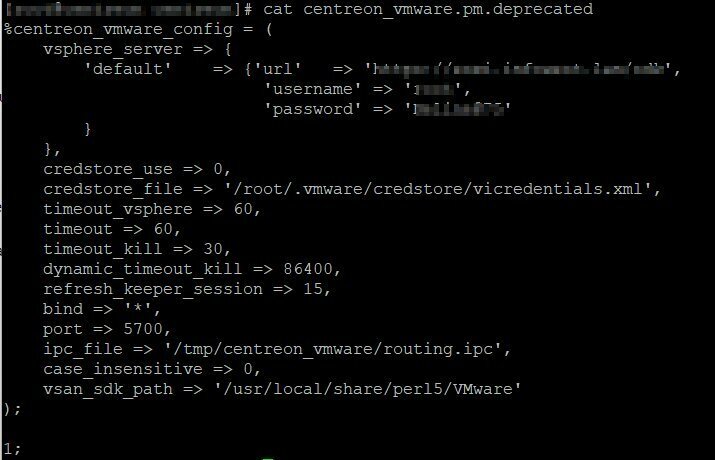
-rw-r--r--.   1 root     root      628 Jan  4 07:12 centreon_vmware.pm.deprecated



Best answer by fmattes

Hi, thanks for these details.

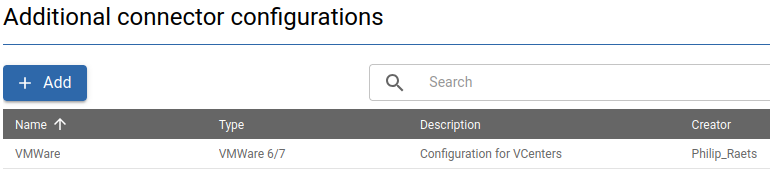
The json file must be populated using the new Additional Connector Configuraiton menu : https://docs.centreon.com/pp/integrations/plugin-packs/getting-started/how-to-guides/additional-connector-configuration/

We will make the release note and upgrade documentation more explicit about that

6 replies

fmattes
Centreonian
Forum|alt.badge.img+10
  • Centreonian
  • January 7, 2025

Hi, 

Thanks for your interest in Centreon.

Could you give me more detail about how you initialy configured centreon_vmware.json ? 

Did you use direct edit on Poller or the dedicated UI (Additional Connector Configuration), brought by Centreon 24.10 ?

Thanks


Forum|alt.badge.img+1
  • Author
  • Steward *
  • January 8, 2025

I have not configured centreon_vmware.json .
After upgrading from version 24.10.2 to version 24.10.3
the initial configuration changed like this:
centreon_vmware.pm => + centreon_vmware.pm.deprecated
+ centreon_vmware.json


that was the perl config, if you upgrade the plugin on the poller this file (centreon_vmware.pm) is converted to json


philipraets
Forum|alt.badge.img+5
  • Steward **
  • January 8, 2025

I have the same problem, everytime I export my poller and move the export files, the file /etc/centreon/centreon_vmware.json is empty

I have to manually edit the file.

after export poller:

{}

What it should be:

{
"vsphere_server" : [
{
"password": "**********",
"username": "vmware-user",
"name": "FIRSTVCENTER",
"url": "https://url-of-first-vcenter-server/sdk"
},
{
"password": "**********",
"username": "vmware-user",
"name": "SECONDVCENTER",
"url": "https://url-of-second-vcenter/sdk"
}
]
}

Where does the export function should get the info to populate this file?


UPDATE:

I found the “Additional connector configuration” in the WebGUI and added my vcenters there. Now its working.


fmattes
Centreonian
Forum|alt.badge.img+10
  • Centreonian
  • Answer
  • January 8, 2025

Hi, thanks for these details.

The json file must be populated using the new Additional Connector Configuraiton menu : https://docs.centreon.com/pp/integrations/plugin-packs/getting-started/how-to-guides/additional-connector-configuration/

We will make the release note and upgrade documentation more explicit about that


Forum|alt.badge.img+1
  • Author
  • Steward *
  • January 9, 2025

🤗Thanks


Forum|alt.badge.img+1
  • Author
  • Steward *
  • January 9, 2025

solved