
Solved

How to use Centreon Linux SSH plugin to execute a shell script on a remote server

  • January 14, 2025
  • 2 replies
  • 235 views

Forum|alt.badge.img+6

Hi,

I added centreon_linux_ssh plugin to be able to execute some shell scripts on remote servers.


I generated public/private ssh keys.

I copied the public key on my remote server.

I tested connection to the remote server without password and it’s works fine.


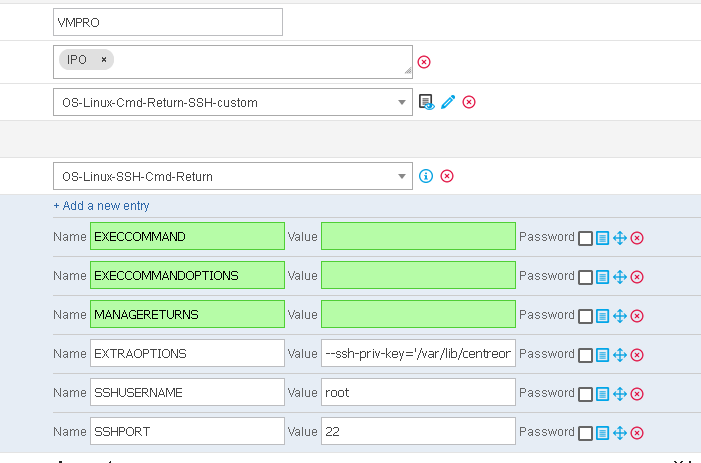
But how to use macros to execute my script ?


My script is based on remote server:


  • Remote server IP: 10.200.10.1
  • Path of the script: /usr/share/snmp/my-scripts/vmpro.sh


The script return the status of a running server (OK, CRITICAL or UNKNOWN.


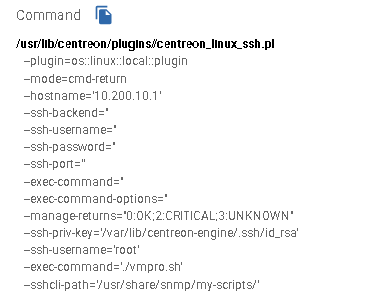
Here is my service created:


Thank you for help

Best answer by cb58

Hi,


One syntax of "manage returns" is :

exit_code1,OK|WARNING|UNKNOWN|CRITICAL,information_text1[#exit_code2,OK|WARNING|UNKNOWN|CRITICAL,information_text2...][#,OK|WARNING|UNKNOWN|CRITICAL,information_text_other_cases]

Here is an example :

0,OK,Etat OK#1,WARNING,Etat warning#,CRITICAL,Etat KO

For your case, you should try :

0,OK,State OK#2,CRITICAL,State critical#3,WARNING,State warning#,WARNING,Unmanaged exit code

Regards

2 replies

Forum|alt.badge.img+6
  • Author
  • Steward **
  • January 14, 2025

I have this error now:


Forum|alt.badge.img+7
  • Steward *
  • Answer
  • January 20, 2025

Hi,


One syntax of "manage returns" is :

exit_code1,OK|WARNING|UNKNOWN|CRITICAL,information_text1[#exit_code2,OK|WARNING|UNKNOWN|CRITICAL,information_text2...][#,OK|WARNING|UNKNOWN|CRITICAL,information_text_other_cases]

Here is an example :

0,OK,Etat OK#1,WARNING,Etat warning#,CRITICAL,Etat KO

For your case, you should try :

0,OK,State OK#2,CRITICAL,State critical#3,WARNING,State warning#,WARNING,Unmanaged exit code

Regards