
Solved

Set static IP

  • November 28, 2024
  • 9 replies
  • 384 views

Forum|alt.badge.img+3

Hello,

please, how to set a static IP address in Centreon 24.10 (Debian)?
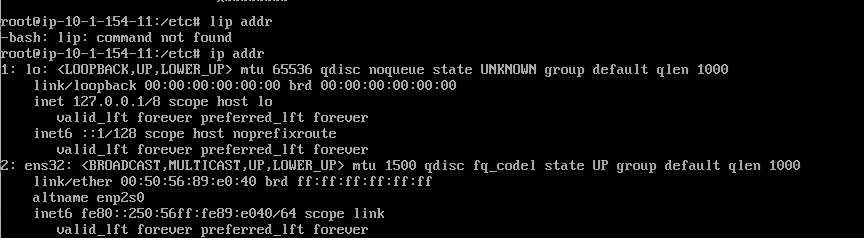
The file “/etc/network/interfaces” does not exist.

Thank You.

 

Best answer by OlivierV

Looks like your machine is using systemd-networkd instead of networking. I’m not familiar with it, this link may help you : https://www.linuxtricks.fr/wiki/systemd-le-reseau-avec-systemd-networkd


9 replies

Forum|alt.badge.img+3
  • Author
  • Steward **
  • November 28, 2024

This works, but only temporarily:

ip addr add 10.0.0.254/24 dev ens32
ip route add default via 10.0.0.1 dev ens32

After restart it disappears.

Can someone help please?


JonioDiPonio
Forum|alt.badge.img+3
  • Steward *
  • November 28, 2024

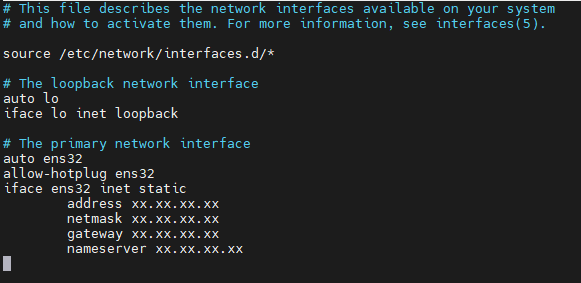
edit the file /etc/network/interfaces

and on the bottom you have your interface, change the parameters with your own.

Remplace xx.xx.xx.xx with your ip and everything.


When it’s done restart the network with : service networking restart

And done you have a static IP.


Forum|alt.badge.img+3
  • Author
  • Steward **
  • November 29, 2024

edit the file /etc/network/interfaces

and on the bottom you have your interface, change the parameters with your own.

Remplace xx.xx.xx.xx with your ip and everything.


When it’s done restart the network with : service networking restart

And done you have a static IP.


This doesn't work there is no “interfaces” file in the directory, There are files “if-pre-up.d” and “if-up.d”.

So I created the “interface” file and wrote the necessary data in it according to the advice, but it ended up with the error "Unit networking.service not found".
 

Don't know what it could be?
Thank You.


Forum|alt.badge.img+3
  • Steward *
  • November 29, 2024

Hello.

Can you try ‘systemctl restart networking’ instead ?


Forum|alt.badge.img+3
  • Author
  • Steward **
  • November 29, 2024

Hello.

Can you try ‘systemctl restart networking’ instead ?

Same result - error.

Did I do something wrong?

  • I downloaded VMWare Appliance “centreon-vmware-vm-24.10-1.deb12.ova.zip”
  • Renamed it to “centreon-vmware-vm-24.10-1.deb12.ova” (they have an mistake there, it's not ZIP, it is only named as ZIP)
  • I deploy it to our VMWare and start it 
  • It is fresh install and I am unable to set static IP.

I try deploy previous version 24.04, but it is TERRIBLE, the version is set to French including the keyboard layout and typing there in VI is nerve wracking. (of course, I chose the ENGLISH option when downloading)


Forum|alt.badge.img+3
  • Steward *
  • November 29, 2024

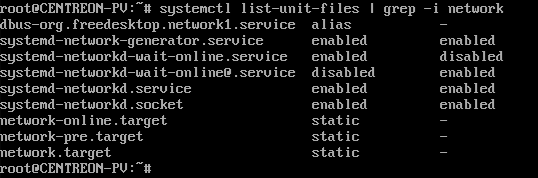
Can you type the command ‘systemctl list-unit-files | grep -i network’ and copy the answer ?


Forum|alt.badge.img+3
  • Author
  • Steward **
  • November 29, 2024

Can you type the command ‘systemctl list-unit-files | grep -i network’ and copy the answer ?


Forum|alt.badge.img+3
  • Steward *
  • Answer
  • November 29, 2024

Looks like your machine is using systemd-networkd instead of networking. I’m not familiar with it, this link may help you : https://www.linuxtricks.fr/wiki/systemd-le-reseau-avec-systemd-networkd


Forum|alt.badge.img+3
  • Author
  • Steward **
  • November 29, 2024

Looks like your machine is using systemd-networkd instead of networking. I’m not familiar with it, this link may help you : https://www.linuxtricks.fr/wiki/systemd-le-reseau-avec-systemd-networkd


It works!!! Thank You very much.